
Photo by panumas nikhomkhai on Pexels
To list AWS resources with natural language, start ChatWithCloud on a read-only profile and ask, for example, “List my EC2 instances with their state and type.” The model writes AWS SDK code for that question, runs it on your machine, and summarizes the JSON result. Each session covers one profile and region, so say “in every region” when you need a wider search.
Inventory is the most common first job for ChatWithCloud: you’ve inherited an account, the bill has a line you don’t recognize, or you just want to know what’s running. This guide shows how to list AWS resources with natural language, which questions give reliable answers, and where the approach runs out.
It’s written for engineers who know their way around AWS but don’t want to write another one-off describe-* loop. You’ll also get plain AWS CLI commands to double-check any answer. Once you know what’s running, the same approach lets you analyze your AWS security posture with an AI CLI.
What happens when you ask for a resource list?
Each question goes through the same loop. The model writes a short AWS SDK for JavaScript v2 script, the script runs on your machine with your profile, and only the minimal JSON result goes back to the model, which writes the answer. If the script fails, the error goes back and the model retries. The ChatWithCloud request loop is described step by step on its own page.
Two consequences matter for inventory work. First, the answer is only as complete as the API calls the script made, so pagination and regions matter. Second, resource names and IDs in the result are sent to the model. Pick a profile whose read access you’re comfortable sharing.
Inventory questions that work well
Specific questions produce specific API calls. The table shows good starting questions and the AWS API a correct script would use, so you know what permission it needs and how to verify it.
| Question | AWS API behind it | Permission |
|---|---|---|
| List my EC2 instances with state, type and Name tag | EC2 DescribeInstances |
ec2:DescribeInstances |
| Can you list all the S3 buckets in my account? | S3 ListBuckets |
s3:ListAllMyBuckets |
| List Lambda functions with runtime and memory size | Lambda ListFunctions |
lambda:ListFunctions |
| How many RDS instances do I have, and are they running? | RDS DescribeDBInstances |
rds:DescribeDBInstances |
Which resources are tagged team=data? |
Resource Groups Tagging API GetResources |
tag:GetResources |
| List my CloudFormation stacks and their status | CloudFormation DescribeStacks |
cloudformation:DescribeStacks |
A tag query is the closest thing to “list everything”, but it has a catch: GetResources returns only resources that are tagged or were tagged before, and only in one region. Untagged resources don’t appear, according to AWS’s GetResources API reference.
Prerequisites and permissions
- ChatWithCloud started with
npx chatwithcloud(or Homebrew, pnpm or Bun). New to it? See how to install ChatWithCloud CLI and answer the first-run questions. - A read-only profile. AWS’s
ViewOnlyAccessjob-function policy grantsList*,Describe*and similar actions without reading resource content, which suits inventory.ReadOnlyAccessworks too, but it also reads data such as S3 objects. - The profile’s region set to where most of your resources live, because that’s the default for every question. The guide to connect ChatWithCloud to AWS profiles, SSO and regions shows how to set it.
Changes run without confirmation. “Delete the unattached volumes” is carried out straight away on a profile that allows it. Keep inventory sessions on a read-only profile, and see the read-only setup on the security page.
How to list AWS resources with natural language, step by step
- Start on the right profile
AWS_PROFILE=cwc-readonly npx chatwithcloud. Check the account and region it reports before asking anything. - Start broad, then countAsk “What’s running in my account?” or “How many EC2 instances, Lambda functions and RDS instances do I have?” Counts are cheap to verify.
- Narrow with attributes“Which of those instances are stopped?” or “List Lambda functions still on a Node.js 16 runtime.” Follow-ups reuse the conversation, so you don’t repeat context.
- Ask for the fields you needName the columns: ID, type, state, launch time, tags. Vague questions get vague summaries.
- Ask how it got the answer“Which API calls did you make, and did you paginate?” catches most incomplete lists.
- Widen only when neededAdd “in every region” for a cross-region check (see below). It’s slower and makes more API calls.
How do you list resources across AWS regions?
A session uses one region: the profile’s, or us-east-1 if none is set. Questions run there unless the generated code explicitly targets other regions. When you ask for “every region”, a correct script first calls EC2 DescribeRegions, then repeats the lookup per region. By default, DescribeRegions returns the regions enabled for your account.
Some services aren’t regional in the usual way. S3 ListBuckets returns all buckets you own, whatever their region, and IAM is global. So “list my buckets” doesn’t need a region loop, while “list my EBS volumes” does. To go further than a bucket list, see how to ask AI which S3 buckets are largest and which are public, then put a monthly price on the biggest ones with the free S3 monthly cost calculator.
To double-check a cross-region answer, the AWS CLI loop below lists every unattached EBS volume in every enabled region:
#!/usr/bin/env bash
# Lists EBS volumes in the "available" state (not attached to an instance)
# across all regions enabled for the account.
set -euo pipefail

for region in $(aws ec2 describe-regions --query 'Regions[].RegionName' --output text); do
  aws ec2 describe-volumes \
    --region "$region" \
    --filters Name=status,Values=available \
    --query 'Volumes[].[VolumeId,Size,VolumeType,CreateTime]' \
    --output text | awk -v r="$region" '{ print r "\t" $0 }'
done
The AWS CLI paginates describe-volumes for you. A generated script has to do it explicitly, which is why asking about pagination is worth the extra question.
Find unused AWS resources from the terminal
“What’s sitting idle?” is where plain-English inventory pays off, because the answer spans several APIs. Good questions, and what they check:
- “List EBS volumes that aren’t attached to anything, with their size.” EC2
DescribeVolumeswith thestatusfilter set toavailable, as defined in AWS’s DescribeVolumes API reference. Unattached volumes still bill for provisioned storage. The SDK v3 example to find and tag unattached EBS volumes tags them for review instead of deleting them. - “Do I have Elastic IPs that aren’t associated with an instance?” EC2
DescribeAddresses, looking for addresses with noAssociationId. A dry-run-first script can find and release unassociated Elastic IP addresses in every region. - “Which instances have been stopped for more than 30 days?” EC2
DescribeInstances. Stopped instances don’t bill for compute, but their EBS volumes still do. - “Which EC2 instances averaged under 5% CPU over the last two weeks?” CloudWatch
GetMetricDataonCPUUtilization. This needs CloudWatch read access. - “Which Lambda functions had no invocations in the last 30 days?” CloudWatch metrics for
AWS/LambdaInvocations. To check the same metric without AI, adapt the SDK v3 script to get Lambda invocation counts for the last 24 hours.
If a function you expected to be busy shows few successful runs, it may be failing rather than unused. In that case, ask AI about Lambda errors in your AWS account before you delete anything.
Idle public IPv4 addresses are a good example of why this matters. As of September 2026, AWS charges $0.005 per hour for each public IPv4 address, whether it’s in use or idle (Amazon VPC pricing). One forgotten Elastic IP for a 730-hour month is 730 × $0.005 = $3.65. Ten of them across old test regions is $36.50 a month for nothing. When idle resources like these show up on your invoice, you can ask AI why your AWS bill increased and trace the change by service.
Treat every result as a candidate list, not a delete list. An “unused” volume may be a deliberate backup, and an idle function may run once a quarter. Review, then clean up through your normal change process. If you want repeatable scripts for this, the hub of AWS practical examples is a starting point, including a script to find the size of each S3 bucket and the largest one.
Troubleshooting inventory answers
These fixes cover wrong or incomplete lists. When the resources are there but misbehaving, see how to troubleshoot AWS infrastructure with an AI CLI.
The list is empty, or resources you know exist are missing
Check account, region and permissions, in that order. Most “missing” resources are in a different region from the profile’s default, or the role can’t list that resource type.
The count looks too low
Many list APIs return results in pages. If a script reads only the first page, you get a partial list with no error. Ask “Did you follow the pagination token?” and have it rerun if not.
AccessDenied or UnauthorizedOperation
The profile lacks a List or Describe permission for that service. The model retries on errors, but it can’t fix IAM for you. Add the specific action to the role, or switch to a broader read-only policy.
Throttling on large accounts
Cross-region loops on big accounts can hit API rate limits. Narrow the question to specific regions or resource types, or ask it to go region by region.
Limits of natural-language inventory
When you list AWS resources with natural language, you trade completeness guarantees for speed:
- It’s a point-in-time answer, not an asset inventory. For continuous tracking, use a service built for it, such as AWS Config.
- One profile and one region per session by default. Cross-account inventory means one session per account.
- It uses AWS SDK for JavaScript v2, which reached end-of-support on 8 September 2025, so newer services may be unreachable.
- The model can be wrong or incomplete. A script that runs without errors can still miss a region or a page.
Frequently asked questions
Can I ask AI what resources are in my AWS account?
Yes. With ChatWithCloud, ask “What’s running in my account?” and then narrow down by service. It lists what the profile can see in the session’s region, and in other regions if you ask for them.
Does it list resources across all AWS regions?
Not by default. Questions run in the profile’s region. Say “in every region” and the generated code can loop through the enabled regions, which takes longer and makes more API calls.
Can it find untagged AWS resources?
Not with a tag query, because the Resource Groups Tagging API only returns tagged or previously tagged resources. Ask per service instead, for example “List EC2 instances without an Owner tag.”
How do I find unused AWS resources from the terminal?
Ask for specific idle signals: unattached EBS volumes, unassociated Elastic IPs, long-stopped instances, or functions with no invocations. Review the results before deleting anything.
Related guides
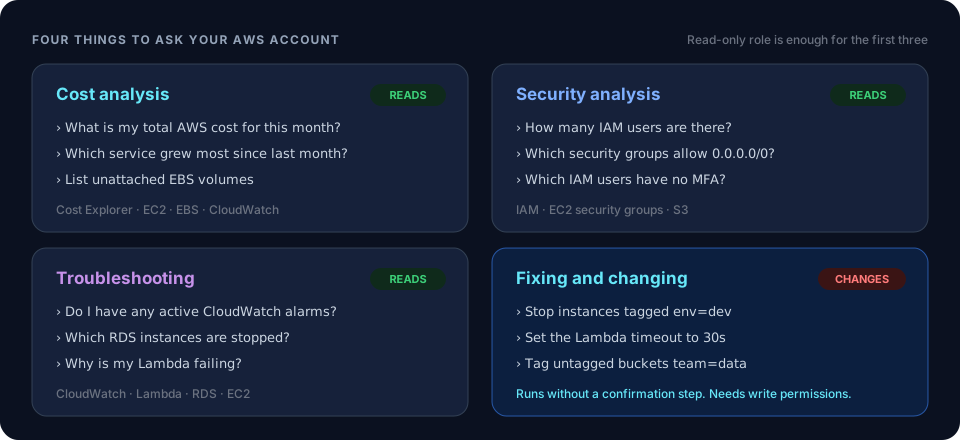 ChatWithCloud use casesCost, security and troubleshooting questions beyond inventory.
 AWS practical examplesReviewed SDK scripts for jobs you want to repeat.
- Find Public and Private S3 Buckets With the AWS SDKLabel every bucket public, blocked or private from BPA, policy status and ACLs.
- Find Security Groups Open to the Internet on Common PortsFlag 0.0.0.0/0 and ::/0 rules on SSH, RDP and database ports.
- Report EC2 Instances by Type, Launch Time and RegionA read-only SDK v3 inventory of every EC2 instance across enabled regions.
- Clean Up AMIs and Snapshots Older Than 30 DaysA report-first script for old AMIs and the snapshots behind them.
Ask your AWS account in plain English
Your first 15 runs are free, with no OpenAI key needed.
npx chatwithcloud