
To ask AI why your AWS bill increased, start ChatWithCloud with a profile that can read Cost Explorer and ask “Compare last month’s cost by service with the month before.” It writes and runs Cost Explorer GetCostAndUsage calls on your machine, then explains which services and usage types grew. Each Cost Explorer API request costs $0.01, so a typical investigation costs a few cents.
A bill that jumped 30% is a question, not a report. You want to know which service, which usage type, which day it started and which resource is behind it. This guide shows how to ask AI why your AWS bill increased from your terminal, what ChatWithCloud calls to answer, the ce: permissions it needs, and what those calls cost.
It’s aimed at engineers and leads who get asked “why is AWS more expensive this month?” and would rather not build a Cost Explorer report to answer it. It goes deeper than the cost section of the ChatWithCloud use cases for cost and security. If you’re still comparing tools for cost questions, see ChatWithCloud vs Amazon Q Developer for AWS in the terminal.
What happens when you ask AI why your AWS bill went up?
ChatWithCloud turns your question into AWS SDK code that runs on your machine with your profile. For cost questions, that code calls the Cost Explorer API. The JSON result goes back to the model, which writes the answer, and you can follow up in the same session. The same loop handles other read-only jobs, for example when you analyze your AWS security posture with an AI CLI.
A good investigation narrows in three moves. Which service grew (group by SERVICE). What kind of usage inside it (group by USAGE_TYPE, for example data transfer versus instance hours). Which resources caused it, which means leaving Cost Explorer and calling the service’s own APIs, such as EC2 DescribeInstances or DescribeNatGateways.
Before you start: Cost Explorer access and ce: permissions
- Cost Explorer must be enabled. You enable it by opening Cost Explorer in the Billing and Cost Management console once; it can’t be enabled through the API. AWS then prepares data for the current month and the previous 13 months. The current month is available in about 24 hours, the rest takes a few days, according to AWS documentation on enabling Cost Explorer.
- Data lags. Cost Explorer updates cost data at least once every 24 hours, so “what did I spend today?” is always partial.
- Member accounts in an AWS Organization can be denied Cost Explorer access by the management account, whatever their IAM permissions.
- The profile needs
ce:actions. A least-privilege policy for the questions in this guide:
{
  "Version": "2012-10-17",
  "Statement": [
    {
      "Sid": "CostExplorerRead",
      "Effect": "Allow",
      "Action": [
        "ce:GetCostAndUsage",
        "ce:GetCostForecast",
        "ce:GetDimensionValues",
        "ce:GetTags",
        "ce:GetAnomalies"
      ],
      "Resource": "*"
    }
  ]
}
Attach it to a read-only role (for example one with ViewOnlyAccess) so the follow-up questions about EC2 or NAT gateways can also be answered. The steps to connect ChatWithCloud to your AWS account with a read-only role show how to add these ce: permissions as an inline policy. Generated code runs without a confirmation step, so don’t use an admin profile for this; the ChatWithCloud security model for read-only profiles explains why.
Questions that find why your AWS bill increased
- Compare two months by service“Break down last month’s bill by service and compare it with the month before.” One
GetCostAndUsagecall withMONTHLYgranularity can return both months. - Drill into the top mover“For EC2-Other, show the change by usage type.” Grouping by
USAGE_TYPEseparates NAT gateway hours, data transfer, EBS storage and similar line items. - Find the day it started“Show daily cost for that usage type over the last 45 days.”
DAILYgranularity usually shows a step change on a specific date, which you can match to a deploy. - Check where“Which region did that increase come from?” Usage types carry a region prefix (such as
EUW1-), and theREGIONdimension works as a filter. That’s often enough to find a forgotten test stack. - Find the resources“List NAT gateways in eu-west-1 with their creation date.” This leaves Cost Explorer and calls the service API directly.
- Check for detected anomalies“Did Cost Anomaly Detection flag anything this month?”
GetAnomaliesreturns anomalies AWS detected, with root causes, for up to 90 days back.
Cost Explorer can group by at most two dimensions per request, and the end date of a time period is exclusive: a period from 2026-08-01 to 2026-09-01 covers all of August. Both details are in AWS’s GetCostAndUsage API reference.
Check the numbers yourself with AWS SDK v3
For anything you’ll report upward, verify the first answer. This TypeScript script, using AWS SDK for JavaScript v3, runs the same month-over-month query and prints the ten services that grew most.
import { CostExplorerClient, GetCostAndUsageCommand } from "@aws-sdk/client-cost-explorer";

// The Cost Explorer API endpoint is in us-east-1.
const client = new CostExplorerClient({ region: "us-east-1" });

function monthStart(offset: number): string {
  const now = new Date();
  const d = new Date(Date.UTC(now.getUTCFullYear(), now.getUTCMonth() + offset, 1));
  return d.toISOString().slice(0, 10);
}

// The two previous full months. Start is inclusive, End is exclusive.
const start = monthStart(-2);
const end = monthStart(0);

const byMonth: Record<string, Record<string, number>> = {};
let nextPageToken: string | undefined;

do {
  // Every request, including each extra page, is billed at $0.01.
  const res = await client.send(
    new GetCostAndUsageCommand({
      TimePeriod: { Start: start, End: end },
      Granularity: "MONTHLY",
      Metrics: ["UnblendedCost"],
      GroupBy: [{ Type: "DIMENSION", Key: "SERVICE" }],
      NextPageToken: nextPageToken,
    })
  );
  for (const period of res.ResultsByTime ?? []) {
    const month = period.TimePeriod?.Start ?? "unknown";
    byMonth[month] ??= {};
    for (const group of period.Groups ?? []) {
      const service = group.Keys?.[0] ?? "unknown";
      const amount = Number(group.Metrics?.UnblendedCost?.Amount ?? "0");
      byMonth[month][service] = (byMonth[month][service] ?? 0) + amount;
    }
  }
  nextPageToken = res.NextPageToken;
} while (nextPageToken);

const [previous, latest] = Object.keys(byMonth).sort();
const services = new Set([
  ...Object.keys(byMonth[previous] ?? {}),
  ...Object.keys(byMonth[latest] ?? {}),
]);

const rows = [...services].map((service) => {
  const before = byMonth[previous]?.[service] ?? 0;
  const after = byMonth[latest]?.[service] ?? 0;
  return { service, before, after, change: after - before };
});

rows.sort((a, b) => b.change - a.change);
console.table(
  rows.slice(0, 10).map((r) => ({
    service: r.service,
    [previous]: r.before.toFixed(2),
    [latest]: r.after.toFixed(2),
    change: r.change.toFixed(2),
  }))
);npm install @aws-sdk/client-cost-explorer
AWS_PROFILE=cwc-readonly npx tsx cost-by-service.ts
# The same query with the AWS CLI (dates are examples)
aws ce get-cost-and-usage \
--time-period Start=2026-07-01,End=2026-09-01 \
--granularity MONTHLY \
--metrics UnblendedCost \
--group-by Type=DIMENSION,Key=SERVICEIf the script’s totals differ from ChatWithCloud’s answer, check the metric. UnblendedCost, AmortizedCost and NetUnblendedCost treat Savings Plans, Reserved Instances and discounts differently, and a model may pick a different one than you’d expect. If Reserved Instances are part of your bill, a read-only script can find EC2 Reserved Instances about to expire in every region. For Savings Plans, the script to check Savings Plans coverage and utilization shows how much eligible spend still ran at On-Demand rates.
What does it cost to ask about your AWS costs?
Asking isn’t free, because the Cost Explorer API is billed per request. Prices as of September 2026, from the AWS Cost Explorer pricing page:
| Item | Price (as of September 2026) |
|---|---|
| Cost Explorer API request (primary billing view) | $0.01 per request |
| Cost Explorer API request (custom billing view) | $0.01 per request per source |
| Hourly granularity (optional) | $0.01 per 1,000 usage records monthly |
| ChatWithCloud runs | First 15 runs free, then one of the ChatWithCloud monthly, yearly or lifetime plans |
Worked example: one investigation versus a polling script
The number of API requests depends on the code the model writes, including extra pages and retries, so treat these as estimates.
- One investigation using the six questions above: questions 1 to 4 and 6 make about one Cost Explorer request each, and one query returns a second page. That’s 5 + 1 = 6 requests, so 6 × $0.01 = $0.06. Question 5 calls EC2, which has no Cost Explorer charge.
- A weekly check with the same pattern: 4 × $0.06 = $0.24 a month.
- A script that polls hourly: 24 × 30 = 720 requests, so 720 × $0.01 = $7.20 a month. Every 5 minutes: 12 × 24 × 30 = 8,640 requests, or $86.40 a month, for data that refreshes about once a day.
The takeaway: ad-hoc questions are cheap. Tight polling loops are not.
How to reduce the cost, and the bill itself
Keep the questions cheap. Ask for both months in one question rather than two. Stay in one session so follow-ups build on earlier answers instead of starting over. Use MONTHLY granularity for comparisons and DAILY only on the usage type you’re chasing. For ongoing monitoring, use AWS Budgets or Cost Anomaly Detection alerts instead of polling the API. The script to create an AWS budget alert with AWS SDK v3 sets up the first one from code. If your team wants a structured cost practice beyond one-off questions, the FinOps Foundation’s FinOps Framework is the common reference.
Common reasons a bill goes up, and the question to ask for each:
- Resources nobody turned off: “List EC2 instances launched in the last 30 days with their Name tag.” To see which resources have no owner at all, find untagged AWS resources with the Tagging API.
- Idle storage: “List EBS volumes that aren’t attached to anything, with their size.” To script it, find and tag unattached EBS volumes with SDK v3. For volumes that are in use, convert EBS gp2 volumes to gp3 to cut their storage price by about 20%.
- Public IPv4 addresses: AWS charges $0.005 per hour for each public IPv4 address, in use or idle, as of September 2026. Ask “Do I have Elastic IPs that aren’t associated with an instance?”, or find and release unassociated Elastic IP addresses with a script.
- NAT gateway and data transfer: group EC2-Other by usage type and look for
NatGateway-BytesorDataTransferline items growing. A gateway that carries almost nothing still bills by the hour; a script can find idle NAT gateways costing you money. - Logs and snapshots that only grow: “Which CloudWatch log groups have no retention policy?” Then set CloudWatch log retention for all log groups that never expire, and find and delete old RDS manual snapshots that outlived their databases.
For a fuller sweep of idle volumes, Elastic IPs and stopped instances across regions, see how to list AWS resources with natural language and find unused ones. If S3 storage is the service that grew, ask AI which S3 buckets are largest, or use the SDK v3 script to calculate the size of each S3 bucket from the CloudWatch BucketSizeBytes metric. If the S3 growth shows up in data transfer rather than storage, see how to estimate AWS S3 data transfer out cost, or model a whole bucket in the free S3 monthly cost calculator.
Troubleshooting cost questions
These errors are specific to Cost Explorer. For failing services rather than failing cost queries, see how to troubleshoot AWS infrastructure with an AI CLI.
AccessDeniedException on a ce: action
The profile lacks Cost Explorer permissions. Add the inline policy above. In a member account, also check that the management account hasn’t turned off linked-account access.
DataUnavailableException
Cost Explorer isn’t enabled yet, or its data isn’t ready. Enable it in the console and wait about 24 hours.
LimitExceededException
Too many calls in a short time. Wait, then ask a narrower question.
The totals don’t match your invoice
Check the metric (unblended versus amortized), whether credits and refunds are included, and whether the current month is marked as estimated in the response. Month-to-date figures are estimates until the month closes.
Limits of AI cost analysis
Asking AI why your AWS bill increased gets you a fast first explanation. Keep these limits in mind before you act on it:
- Answers are point-in-time and lag by up to a day. It’s not a FinOps platform or a budget alert.
- The model can pick the wrong metric or time range. Ask it which query it ran before you quote a number.
- One profile per session. In an Organization, only the management account sees every member account’s costs.
- Generated code uses AWS SDK for JavaScript v2, which reached end-of-support on 8 September 2025.
Frequently asked questions
How do I find out why my AWS bill went up?
Compare the last two months by service, drill into the service that grew by usage type, find the day it started with daily data, then look up the resources behind it. You can do this in Cost Explorer, with the AWS CLI, or by asking ChatWithCloud in plain English.
Does asking AI about AWS costs cost money?
Yes, a little. Each Cost Explorer API request costs $0.01 as of September 2026. A typical investigation makes a handful of requests. ChatWithCloud’s first 15 runs are free.
What permissions does a cost analysis need?
Cost Explorer read actions such as ce:GetCostAndUsage, ce:GetCostForecast and ce:GetDimensionValues, plus read-only access to the services you want to drill into.
Can AI find the biggest AWS cost drivers?
Yes, if it has the data. Grouping by service and then usage type ranks the drivers. Mapping a usage type to specific resources needs extra calls to that service’s API.
Can it forecast next month’s AWS bill?
It can call Cost Explorer’s GetCostForecast, which returns AWS’s own forecast. Treat it as an estimate, especially after a recent change in usage.
Related guides
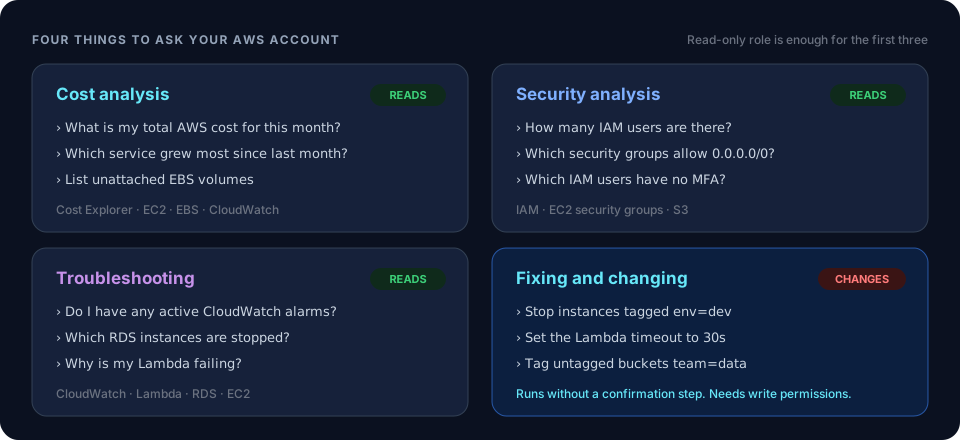 ChatWithCloud use casesCost, security, troubleshooting and change requests side by side.
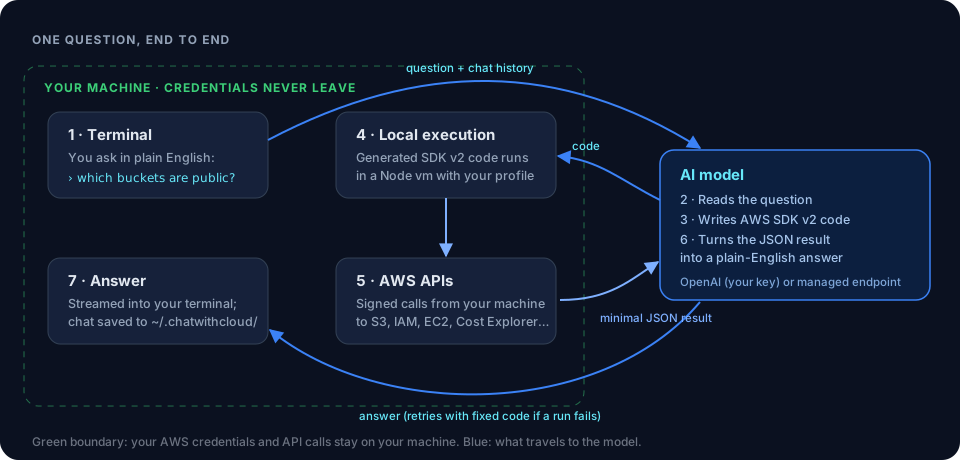 How ChatWithCloud worksWhat runs locally and what’s sent to the model.
 Find Overprovisioned DynamoDB Read and Write CapacityCompare provisioned tables and GSIs with last month’s consumed capacity.
 List AWS resources with natural languageFind the idle resources behind a cost increase.
- Get Last Month’s AWS Cost Broken Down by ServiceAn SDK v3 Cost Explorer script that totals last month by service.
- Detect and Stop Underutilized EC2 Instances by CPUFind EC2 instances with low CPU over 14 days and stop them on request.
Ask your AWS account in plain English
Your first 15 runs are free, with no OpenAI key needed.
npx chatwithcloud