
Photo by Pakata Goh on Unsplash
ChatWithCloud vs Amazon Q Developer comes down to where you work and how much control you want. Amazon Q Developer answers account questions in the AWS console with read-only calls, and its terminal client is now Kiro CLI, which asks before each AWS call by default. ChatWithCloud is a terminal tool that writes and runs AWS SDK code with your local profile, without a confirmation step.
This comparison is for engineers deciding between an AWS-native assistant and a third-party CLI for questions like “which instances are idle?” or “why did costs go up?”. It covers how each one reaches your account, what it can and can’t answer, pricing, data handling, and a plain “choose this if” section. Every Amazon Q statement is attributed to AWS’s own documentation or pricing pages, checked in September 2026. ChatWithCloud is not affiliated with Amazon Web Services.
What changed: Amazon Q Developer in the terminal is now Kiro CLI
If you last looked at this in 2025, the terminal side has moved. The Amazon Q Developer user guide’s command-line page now says “The Q CLI has become the Kiro CLI.” The original open-source repository says it is no longer actively maintained, will only receive critical security fixes, and that Amazon Q Developer CLI “is now available as Kiro CLI, a closed-source product” (see the notice in the amazon-q-developer-cli repository README on GitHub).
According to AWS’s Amazon Q Developer FAQs, existing Q Developer Pro subscriptions can be used with Kiro CLI, and q update switches an existing install to it. So in this article, “Amazon Q Developer in the terminal” means Kiro CLI, and “Amazon Q in the console” means the chat panel in the AWS Management Console.
ChatWithCloud vs Amazon Q Developer at a glance
| ChatWithCloud | Amazon Q Developer | |
|---|---|---|
| Where you use it | Terminal (npx chatwithcloud, Homebrew, pnpm, Bun) |
AWS console, console mobile app, Slack and Teams; terminal via Kiro CLI; IDE plugins (end of support 30 April 2027) |
| How it reads your account | The model writes AWS SDK for JavaScript v2 code; it runs on your machine with a profile from ~/.aws |
Console: service APIs and Cloud Control API with your IAM identity. Kiro CLI: a built-in aws tool that makes AWS CLI calls |
| Can it change resources? | Yes, if the profile allows it, and without a confirmation step | Console resource chat uses get, list and describe actions. Kiro CLI’s aws tool prompts for permission by default |
| Regions | One profile and region per session | Console: name a region in the question, or it uses the console region |
| Security and identity questions | Anything your profile can read, including IAM | Console chat can’t answer questions about account security, identity, credentials or cryptography |
| Cost analysis | Cost Explorer calls, with ce: permissions |
Cost Explorer, Cost Optimization Hub, Compute Optimizer, budgets, charts and console deep links |
| AI model | GPT-4o, GPT-4o Mini, GPT-4 Turbo or GPT-4 with your OpenAI key; managed model on the trial and subscription | Built on Amazon Bedrock |
| Price | First 15 runs free; $19/month, $190/year, or $399 lifetime with your own OpenAI key | Free tier; Pro at $19 per user per month |
Amazon Q sources for the table: AWS’s Amazon Q Developer user guide (“Chatting about your resources” and “What is Amazon Q Developer”), Kiro’s built-in tools reference, the AWS Cost Management guide to cost analysis in Amazon Q Developer, and AWS’s Amazon Q Developer pricing page. ChatWithCloud details are on the page explaining how ChatWithCloud runs AWS SDK code locally; to try it, install the ChatWithCloud CLI with npx or Homebrew.
How does each tool reach your AWS account?
Amazon Q in the console
Q answers resource questions by calling service APIs and AWS Cloud Control API with your IAM identity. AWS says it “can perform get, list, and describe actions” and “will never access resources that your IAM identity doesn’t have access to.” It builds multi-step plans for complex questions, and normal API fees apply to the calls it makes. It can’t answer questions about data stored in your resources, such as listing objects in an S3 bucket, or about security, identity, credentials or cryptography, according to the “Chatting about your resources” page of AWS’s user guide.
Kiro CLI
Kiro CLI has a built-in aws tool (alias use_aws) described as a “tool for making AWS CLI calls with the specified service, operation, and parameters.” Along with shell and write, it prompts for permission by default. You can configure it to auto-allow read-only calls with autoAllowReadonly, or allow and deny specific services (see the Kiro CLI built-in tools reference). You sign in to Kiro with GitHub, Google, AWS Builder ID or IAM Identity Center, per Kiro’s authentication docs.
ChatWithCloud
ChatWithCloud reads the profiles already in ~/.aws/credentials and ~/.aws/config, including IAM Identity Center profiles and roles that need MFA (the guide to connect ChatWithCloud to AWS profiles, SSO and roles walks through each). For each question the model writes AWS SDK for JavaScript v2 code, the code runs locally in a Node.js vm context, and the minimal JSON result goes back to the model. If the code fails, the error goes back and the model retries. Credentials stay in ~/.aws and are never uploaded.
The important difference: ChatWithCloud runs generated code straight away. Use a read-only profile (AWS’s ReadOnlyAccess managed policy covers most questions) unless you deliberately want it to make changes. The ChatWithCloud security and read-only setup page covers the details.
Which one answers more AWS account questions?
They overlap on the everyday questions: listing instances, describing a Lambda function, finding alarms, explaining a cost increase. The differences are at the edges.
- Security posture questions. Q in the console says it can’t answer questions related to account security, identity, credentials or cryptography. ChatWithCloud can query IAM users, roles and policies if your profile can read them, which is how you analyze your AWS security posture with an AI CLI. Whether it’s right is another matter; check what it tells you.
- Data inside resources. Q’s console chat doesn’t list S3 objects. ChatWithCloud can make any SDK v2 call your profile allows, including listing objects.
- Cross-region questions. Q lets you name the region per question. ChatWithCloud uses one region per session, so a multi-region inventory means several sessions.
- Newer services. ChatWithCloud’s generated code uses SDK v2, which reached end-of-support on 8 September 2025, so services launched after that may be missing. That limit is specific to ChatWithCloud.
- Troubleshooting guidance. AWS’s user guide documents console troubleshooting prompts for S3 permissions, ECS task stops, load balancer 5xx errors and EKS add-ons. ChatWithCloud gathers the same evidence from the terminal (see how to troubleshoot AWS infrastructure with an AI CLI) but gives no AWS-curated guidance. For permission errors, you can also work through how to troubleshoot AWS IAM access denied errors step by step.
How do they compare on AWS cost questions?
This is where Amazon Q is strongest. It can analyze historical and forecasted costs from Cost Explorer, pull recommendations from Cost Optimization Hub and Compute Optimizer, check budgets and anomalies, draw charts, and show the exact API calls it made with links to matching console views. In an organization’s management account it aggregates cost data across member accounts, according to the AWS Cost Management user guide.
ChatWithCloud can answer cost questions through Cost Explorer calls if your profile has ce: permissions. It works in the terminal and you can follow up (see how to ask AI why your AWS bill increased), but it has no charts and no built-in link to Cost Optimization Hub recommendations unless the model calls those APIs. For a repeatable report without AI, there’s an SDK v3 script to find your most expensive AWS service with Cost Explorer.
What does each cost?
Prices as of September 2026. Check the official pages before you decide.
| Plan | What you get |
|---|---|
| Amazon Q Developer Free | 50 agentic requests per month in the IDE and CLI; up to 25 questions per account per month that need account or resource context, including cost questions |
| Amazon Q Developer Pro | $19 per user per month; higher limits, admin dashboard, IAM Identity Center support, IP indemnity |
| ChatWithCloud trial | First 15 runs free, no OpenAI key needed |
| ChatWithCloud Monthly / Yearly | $19 per month or $190 per year, managed, no OpenAI key |
| ChatWithCloud Lifetime | $399 one-time, with your own OpenAI key |
Amazon Q figures come from AWS’s Amazon Q Developer pricing page and the 25-question limit from AWS’s cost management guide. The ChatWithCloud monthly, yearly and lifetime plans are listed in full on the pricing page. With the lifetime plan you also pay OpenAI for your own usage. With either tool, the AWS API calls themselves are billed as usual.
What data leaves your machine or account?
Amazon Q: the pricing page lists data collection as “Opt-out available” on the Free tier and “Automatically opted out” on Pro. AWS’s Amazon Q Developer FAQs say the Free tier might use certain content for service improvement, and Pro does not.
ChatWithCloud: your question, the conversation context and the JSON returned by the AWS calls are sent for processing: straight to OpenAI if you use your own key, or to ChatWithCloud’s managed endpoint on the trial or a subscription. Settings and conversations are stored as JSON under ~/.chatwithcloud/. The ChatWithCloud data handling details list exactly what is sent.
Choose Amazon Q Developer if…
- You want answers inside the AWS console with nothing to install, plus charts and deep links to the resources.
- Cost analysis is the main job, especially across an AWS Organization, with Cost Optimization Hub and Compute Optimizer recommendations.
- You want an approval prompt before each AWS call in the terminal (Kiro CLI’s default), or read-only calls only in the console.
- You need company controls: IAM Identity Center, an admin dashboard, IP indemnity, and content excluded from service improvement on Pro.
- You also want coding help in the IDE, or questions in Slack and Teams.
Choose ChatWithCloud if…
- You live in the terminal and want to use the profiles already in
~/.aws, including SSO and MFA roles. - You want to ask about IAM identities or the objects in a bucket, which Q’s console chat doesn’t answer.
- You want to pick the OpenAI model, or pay once with the lifetime plan and your own key.
- You’re comfortable running it with a read-only profile, since there’s no confirmation step.
Plenty of teams will use both: Q in the console for cost deep-dives and guided fixes, and a terminal tool for quick inventory and security checks. If you’re still weighing it, the ChatWithCloud CLI frequently asked questions cover the common setup questions, and the AWS cost, security and troubleshooting use cases show the kinds of questions it handles.
Frequently asked questions
Is ChatWithCloud an Amazon Q alternative for the AWS terminal?
For asking questions about your AWS account from the terminal, yes. It’s not a replacement for Amazon Q’s IDE features, code transformation or console integration.
Does Amazon Q Developer still have a CLI?
The Amazon Q Developer CLI has been rebranded to Kiro CLI. Q Developer Pro subscriptions can be used with it, and q update switches an existing install, per the Amazon Q Developer FAQs.
Which one is safer to point at production?
By default, Amazon Q: console resource chat is read-only and Kiro CLI prompts before AWS calls. ChatWithCloud runs generated code without asking, so only use it on production with a read-only profile.
Do they cost the same?
Amazon Q Developer Pro and ChatWithCloud’s monthly plan are both $19 per month (Q’s is per user). Both have a free starting point: Q’s Free tier and ChatWithCloud’s 15 free runs.
Related guides
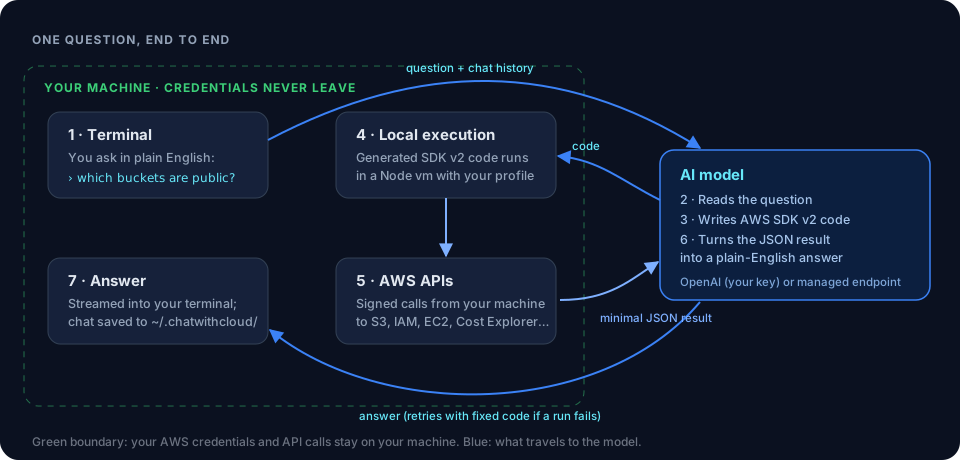 How ChatWithCloud worksInstall, profiles and the question-to-code loop.
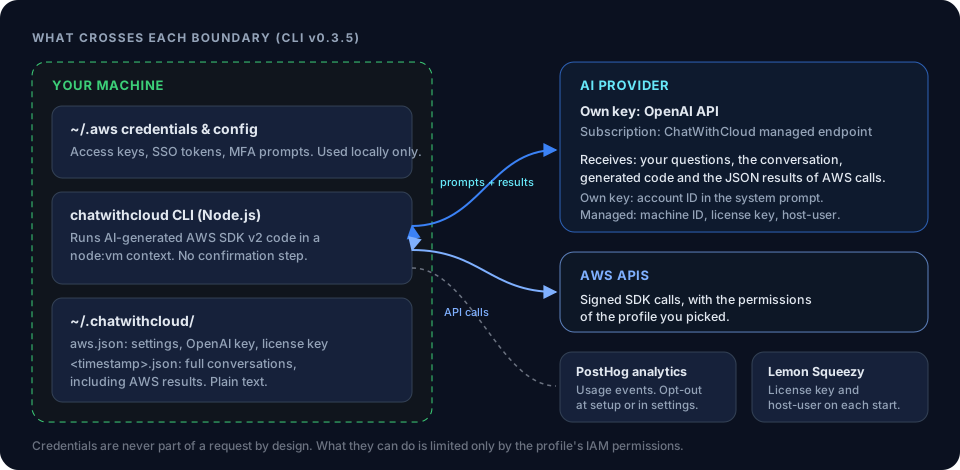 Security modelWhat’s sent, what stays local, and a read-only setup.
Install the ChatWithCloud CLInpx, Homebrew, pnpm and Bun.
Connect ChatWithCloud to your AWS accountProfiles, SSO and roles.
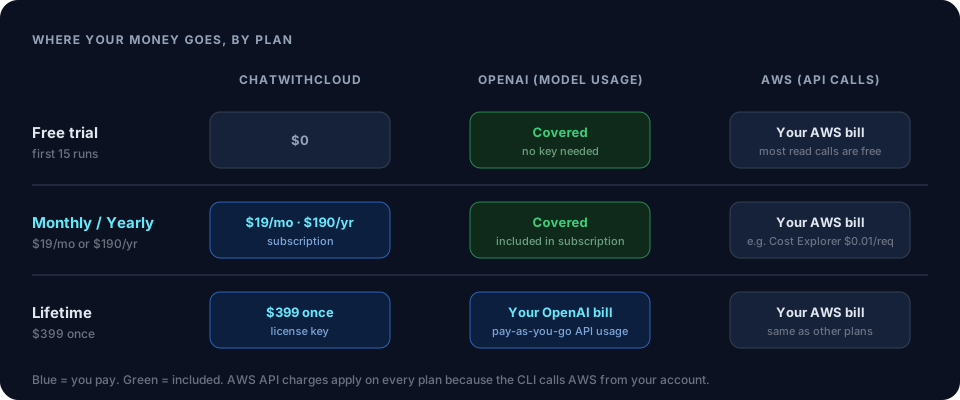 PricingTrial, monthly, yearly and lifetime plans.
Troubleshoot AWS IAM Access Denied Errors Step by StepRead the error, confirm the caller, find the missing IAM action, rule out explicit…
Ask your AWS account in plain English
Your first 15 runs are free, with no OpenAI key needed.
npx chatwithcloud