ChatWithCloud FAQ
Straight answers about the ChatWithCloud CLI: installing it, what happens when you ask a question, what leaves your machine, how pricing and licenses work, and what common error messages mean.
Getting started
What is ChatWithCloud?
ChatWithCloud is a command-line tool that lets you ask questions about your AWS account in plain English. It writes AWS SDK code to answer each question, runs that code on your machine with your AWS credentials, and explains the result. See what people use it for.
How do I install ChatWithCloud?
Run it without installing using npx chatwithcloud, pnpm dlx chatwithcloud or bunx chatwithcloud. On macOS you can use Homebrew: brew tap chatwithcloud/tap && brew install chat-with-cloud. After a global install with npm install -g chatwithcloud, the tool is available as both chatwithcloud and the shorter cwc. The full ChatWithCloud CLI installation guide covers npx, Homebrew, pnpm and Bun.
What do I need before I start?
You need Node.js (for npx, pnpm or bun) or Homebrew, an AWS account, and at least one profile in ~/.aws/credentials or ~/.aws/config. AWS explains how to set these up in its guide to AWS configuration and credential files. An OpenAI API key is optional.
Can I try ChatWithCloud for free?
Yes. Your first 15 runs are free, and you don’t need an OpenAI key or a payment card. When the trial ends, ChatWithCloud asks for a license key. See plans and pricing.
Do I need to know AWS to use it?
No. On first run, ChatWithCloud asks for your AWS experience level (Beginner, Intermediate or Pro) and uses it to tailor its answers. You ask in everyday language and it handles the SDK calls. Knowing the basics of AWS services helps you ask sharper questions.
How do I change my settings later?
Type /settings at the question prompt to go through setup again, including experience level, AI model and analytics. All settings are stored in ~/.chatwithcloud/aws.json, which you can also edit directly.
How it works
What happens when I ask a question?
The AI model writes JavaScript that uses the AWS SDK for JavaScript v2 to answer your question. ChatWithCloud runs that code on your machine, sends the result back to the model as JSON, and the model writes the answer. If the code fails, the error goes back to the model so it can try a fixed version. Read the full walkthrough in how ChatWithCloud works.
Which AI models does ChatWithCloud use?
With your own OpenAI API key, you choose the model during setup: GPT-4o, GPT-4o Mini, GPT-4 Turbo or GPT-4. On the free trial and the managed subscription, requests go through ChatWithCloud’s managed service, which chooses the model for you.
Which AWS services can it work with?
Any service the AWS SDK for JavaScript v2 supports, including EC2, S3, IAM, Lambda, RDS, CloudWatch and Cost Explorer. What it can actually read or change is limited by the permissions of the AWS profile you pick. You can ask follow-up questions, and it keeps the context of earlier answers within a session.
Which AWS profile and region does it use?
At startup it lists the profiles in your ~/.aws files and asks you to pick one. Set the AWS_PROFILE environment variable to skip the prompt. The region comes from the profile’s region setting, and defaults to us-east-1 if the profile doesn’t set one. See how to connect ChatWithCloud to your AWS account with profiles, SSO or roles.
Can ChatWithCloud change or delete resources?
Yes. It can make any API call your credentials allow, including creating, modifying and deleting resources, and it runs generated code without asking for confirmation first. If you only want answers, run it with a read-only profile. See security and permissions.
Security & privacy
Do my AWS credentials leave my machine?
No. The AWS SDK loads your credentials locally from your profile, including SSO and MFA profiles, and every AWS API call is made from your computer. Your access keys and session tokens are never included in requests to the AI.
What data is sent to the AI model?
Your questions, the code the model writes, and the result of each AWS call, returned as JSON and trimmed to what the question needs. With your own OpenAI key, this goes directly to OpenAI. On the free trial and the managed subscription, it goes through ChatWithCloud’s managed service together with your license key and a machine identifier. Details are on the security page.
Does ChatWithCloud collect analytics?
Setup asks whether to enable anonymous product analytics, which use PostHog. Choose No, or set "analytics": "no" in ~/.chatwithcloud/aws.json, to turn it off. When analytics is on, usage events are recorded, and if generated code fails, the code and its error message are included.
How do I make ChatWithCloud read-only?
Select a profile whose role only has read permissions, such as the AWS managed ReadOnlyAccess policy or a narrower custom policy. Any call that tries to change something then fails with an access denied error. Note that ReadOnlyAccess can still read data such as S3 object contents. When a read-only role blocks a call you expected to work, follow the guide to troubleshoot AWS IAM access denied errors.
What files does ChatWithCloud store on my computer?
Settings live in ~/.chatwithcloud/aws.json, including your chosen model, OpenAI API key and license key in plain text. Each session is also saved as a JSON file in the same folder, containing the full conversation and the AWS results. Delete those files to remove your history.
How is ChatWithCloud different from Amazon Q?
Amazon Q Developer is AWS’s own assistant for the console and IDEs. ChatWithCloud runs in your terminal, writes and executes AWS SDK code with your profile’s permissions, and lets you bring your own OpenAI key and choose the model. The detailed ChatWithCloud vs Amazon Q Developer comparison covers pricing, permissions and the Kiro CLI change.
Pricing & licensing
How much does ChatWithCloud cost?
The first 15 runs are free. The managed subscription is $19 a month or $190 a year and includes unlimited usage with no OpenAI key needed. The lifetime license is a one-time $399 and uses your own OpenAI key, so OpenAI bills you separately for usage. Compare them on the pricing page.
How do I activate a license key?
When your trial ends, ChatWithCloud shows Your trial is over! Please enter ChatWithCloud License Key. Paste your key there and it’s validated through Lemon Squeezy, the store that handles payments. The activation is registered under your computer’s host and user name.
How do I change my OpenAI API key?
Edit the openaiApiKey value in ~/.chatwithcloud/aws.json. If OpenAI rejects the saved key, ChatWithCloud prompts you for a new one automatically.
Troubleshooting
What does “Profile … was not found!” mean?
The AWS_PROFILE environment variable names a profile that isn’t in your ~/.aws/credentials or ~/.aws/config files. Check the spelling with aws configure list-profiles, or unset the variable to pick from the list.
Why do I see “Looks like you’ve provided an incorrect OpenAI API key”?
OpenAI rejected your key, usually because it was mistyped, revoked, or the OpenAI account has no active billing. ChatWithCloud then asks for a new key. Create one in your OpenAI dashboard and paste it in.
Why does it say “Please reply with at least 2 characters”?
ChatWithCloud ignores inputs that are too short to be a question. Type a full question, such as “How many Lambda functions do I have?”, or /settings to open settings.
My SSO login seems stuck. What should I do?
For SSO profiles, ChatWithCloud prints Please finish the SSO authentication in your browser with a link, then waits. Open the link, approve the request, and it continues on its own. See AWS’s guide to configuring IAM Identity Center (SSO) profiles.
What does “That did not work. Retrying…” mean?
The code the model wrote threw an error, often an access denied error, a wrong parameter or a missing resource. The error is sent back to the model, which writes a corrected version. If it keeps failing, check your profile’s permissions or rephrase the question.
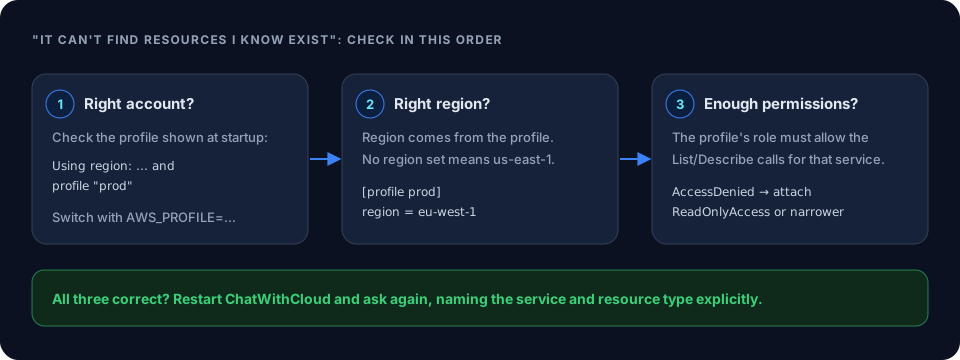
Why can’t it find resources I know exist?
It’s almost always the account, region or permissions. Check the profile and region printed at startup, set the correct region in that profile, and make sure the profile’s role can list that type of resource. Browse the practical AWS examples to see which API calls each kind of lookup needs. The guide to list AWS resources with natural language covers regions, profiles and permissions.
Try it on your own account
Your first 15 runs are free, with no signup and no OpenAI key.
Question not covered here? Email [email protected].