
To analyze AWS security posture with an AI CLI such as ChatWithCloud, start it on a read-only profile and ask targeted questions: which IAM users have no MFA, which access keys are old, which security groups allow 0.0.0.0/0, which S3 buckets lack Block Public Access. It runs the IAM, EC2 and S3 API calls on your machine and explains the findings. The result is a point-in-time check, not continuous compliance.
You’ve inherited an AWS account, an audit is next week, or something just looks off. You want answers in minutes, not a new security platform. This guide shows how to analyze AWS security posture with an AI CLI, which questions to ask in which order, what each one calls, and how to verify a finding yourself.
It goes deeper than the security section of the ChatWithCloud use cases for security reviews, and it’s honest about where a dedicated service such as AWS Security Hub CSPM is the better tool.
What can an AI CLI check in your AWS security posture?
ChatWithCloud turns each question into AWS SDK code, runs it with your profile, and has the model explain the JSON result. Any read-only check that AWS exposes through an API is fair game. These are the checks worth running first, with the API a correct script would use and the permission it needs.
| Check | AWS API | IAM permission |
|---|---|---|
| Root user has MFA | IAM GetAccountSummary (AccountMFAEnabled) |
iam:GetAccountSummary |
| Users with a password but no MFA | IAM credential report (password_enabled, mfa_active) |
iam:GenerateCredentialReport, iam:GetCredentialReport |
| Old or unused access keys | Credential report (access_key_1_last_rotated, access_key_1_last_used_date) |
Same as above |
Who has AdministratorAccess |
IAM ListEntitiesForPolicy |
iam:ListEntitiesForPolicy |
Custom policies allowing * on * |
IAM ListPolicies + GetPolicyVersion |
iam:ListPolicies, iam:GetPolicyVersion |
| Security groups open to the internet | EC2 DescribeSecurityGroupRules |
ec2:DescribeSecurityGroupRules |
| S3 Block Public Access | S3 GetPublicAccessBlock, S3 Control GetPublicAccessBlock, GetBucketPolicyStatus |
s3:GetBucketPublicAccessBlock, s3:GetAccountPublicAccessBlock, s3:GetBucketPolicyStatus |
| CloudTrail is logging | CloudTrail DescribeTrails + GetTrailStatus |
cloudtrail:DescribeTrails, cloudtrail:GetTrailStatus |
The credential report is the workhorse for user checks. It covers passwords, MFA and the first two access keys per user, and IAM regenerates it at most once every four hours (IAM credential reports).
Set up a read-only security audit profile
Security questions only read, so there’s no reason to run them with write access. That matters more than usual here, because ChatWithCloud runs generated code without a confirmation step. “Remove the open rule” would be carried out immediately on a profile that allows it.
Two options. The quick one is AWS’s SecurityAudit job-function policy, which AWS’s job-function policy documentation describes as granting permission “to view configuration data for many AWS services and to review their logs”. The narrow one is a custom policy covering just the checks in this guide:
{
  "Version": "2012-10-17",
  "Statement": [
    {
      "Sid": "IamPosture",
      "Effect": "Allow",
      "Action": [
        "iam:GetAccountSummary",
        "iam:GenerateCredentialReport",
        "iam:GetCredentialReport",
        "iam:ListUsers",
        "iam:ListPolicies",
        "iam:GetPolicyVersion",
        "iam:ListEntitiesForPolicy"
      ],
      "Resource": "*"
    },
    {
      "Sid": "NetworkAndLogging",
      "Effect": "Allow",
      "Action": [
        "ec2:DescribeSecurityGroups",
        "ec2:DescribeSecurityGroupRules",
        "ec2:DescribeRegions",
        "cloudtrail:DescribeTrails",
        "cloudtrail:GetTrailStatus"
      ],
      "Resource": "*"
    },
    {
      "Sid": "S3AccountLevel",
      "Effect": "Allow",
      "Action": [
        "s3:ListAllMyBuckets",
        "s3:GetAccountPublicAccessBlock"
      ],
      "Resource": "*"
    },
    {
      "Sid": "S3BucketLevel",
      "Effect": "Allow",
      "Action": [
        "s3:GetBucketPublicAccessBlock",
        "s3:GetBucketPolicyStatus",
        "s3:GetBucketLocation"
      ],
      "Resource": "arn:aws:s3:::*"
    }
  ]
}
Attach it to a dedicated role and start the CLI with AWS_PROFILE=cwc-security npx chatwithcloud. The steps to set up a read-only IAM role and profile for ChatWithCloud apply unchanged; only the policy differs. If you’d rather not write JSON by hand, the IAM policy generator for TypeScript or the IAM policy generator for Python code drafts a policy from SDK calls in your code; review the generated IAM policy for least privilege before use.
How to analyze AWS security posture with an AI CLI, step by step
- Root first“Does the root user have MFA, and does it have access keys?”
GetAccountSummaryreturnsAccountMFAEnabledandAccountAccessKeysPresent. For a repeatable check that also reads root sign-ins from the credential report, check the AWS root user for MFA and access keys with a script. - Human users“Which IAM users have console access but no MFA device?” This reads the credential report. For a repeatable check, find IAM users without MFA using AWS SDK v3.
- Keys“Which active access keys are older than 90 days, and when were they last used?” The script version can find IAM access keys older than 90 days or never used and deactivate them after a dry run.
- Over-broad permissions“Which users, groups and roles have AdministratorAccess attached?” then “Do any customer managed policies allow every action on every resource?” Roles nobody has assumed in months are worth a question too; the script to find unused IAM roles with RoleLastUsed answers it. Users with policies attached outside any group are the hardest to review, and the script to find IAM users with directly attached policies lists them.
- Network exposure“Which security groups allow inbound traffic from 0.0.0.0/0 or ::/0, and on which ports?” Follow up with “Which of those are attached to running instances?” The script to find EC2 instances with public IP addresses answers that follow-up across Regions. Groups attached to nothing can go; the script to find unused security groups checks every dependency first. For the instances themselves, ask which still allow IMDSv1, or run the script to find EC2 instances without IMDSv2 and require it. For load balancers, ask which HTTP listeners don’t redirect to HTTPS, or run the script to find load balancers serving plain HTTP without a redirect. For Kubernetes, ask which EKS clusters have a public endpoint, or run the script to find EKS clusters with a public API endpoint open to 0.0.0.0/0.
- Data exposure“Is S3 Block Public Access on at the account level? Which buckets don’t have all four settings enabled?” Then “Are any EBS or RDS snapshots public?”, which the script to find public EBS and RDS snapshots also answers. For compute, “Which Lambda function URLs have auth type NONE?” is the equivalent question, and the script to find public Lambda function URLs checks the resource policy as well. For APIs, ask which API Gateway methods have authorization type
NONE, or run the script to find API Gateway methods without authorization. For a continuous view of resources shared outside your account, the script to check IAM Access Analyzer is enabled in every Region and list its findings is the next step. - Logging“Is there a CloudTrail trail that’s logging in every region?” A session covers one Region, so for the whole account run the script to check CloudTrail is logging in every AWS Region. Requests to your own APIs aren’t in CloudTrail; the script to find API Gateway stages without access logging checks those.
- Write it up“Summarize the findings from this session as a prioritized list.” The conversation holds the earlier results.
Regions matter for step 5: security groups are regional, and a session uses one region unless you ask for “every region”. IAM is global, and the account-level S3 setting applies to all regions. For a closer look at bucket exposure, see how to ask AI which S3 buckets are public and which hold the most data, or run the SDK v3 script to find public and private S3 buckets from Block Public Access, policy status and ACLs. The same region rules apply when you list AWS resources with natural language for an inventory.
Verify a finding yourself: open security groups
Before you act on a finding, confirm it with code you’ve read. This AWS SDK for JavaScript v3 script lists every inbound rule open to the whole internet in the profile’s region.
import { EC2Client, paginateDescribeSecurityGroupRules } from "@aws-sdk/client-ec2";

// Region and credentials come from AWS_PROFILE / AWS_REGION.
const client = new EC2Client({});

const WORLD = new Set(["0.0.0.0/0", "::/0"]);
const open: { groupId: string; protocol: string; ports: string; source: string }[] = [];

for await (const page of paginateDescribeSecurityGroupRules({ client }, {})) {
  for (const rule of page.SecurityGroupRules ?? []) {
    const source = rule.CidrIpv4 ?? rule.CidrIpv6 ?? "";
    if (rule.IsEgress || !WORLD.has(source)) continue;

    let ports = "all";
    if (rule.IpProtocol !== "-1") {
      ports = rule.FromPort === rule.ToPort ? `${rule.FromPort}` : `${rule.FromPort}-${rule.ToPort}`;
    }
    open.push({
      groupId: rule.GroupId ?? "",
      protocol: rule.IpProtocol === "-1" ? "all" : rule.IpProtocol ?? "",
      ports,
      source,
    });
  }
}

if (open.length === 0) {
  console.log("No inbound rules open to 0.0.0.0/0 or ::/0 in this region.");
} else {
  console.table(open);
}npm install @aws-sdk/client-ec2
AWS_PROFILE=cwc-security AWS_REGION=eu-west-1 npx tsx open-security-groups.tsAn open rule isn’t automatically a problem. Port 443 on a public load balancer’s group is expected. Port 22 or 3389 open to the world usually isn’t. To flag SSH, RDP, database ports and all-traffic rules in one script, use the example to find security groups open to the internet on common ports.
What an AI CLI isn’t: Security Hub, Config and GuardDuty
ChatWithCloud gives ad-hoc, point-in-time answers to the questions you think to ask. It doesn’t run continuously, keep history, score you against a benchmark, or alert anyone. Those jobs belong to dedicated services:
- AWS Security Hub CSPM (what AWS previously offered as Security Hub) evaluates your environment against security standards and best practices on an ongoing basis. The new AWS Security Hub correlates findings from Security Hub CSPM and services such as Amazon Inspector to prioritize risks, according to AWS documentation. It works per Region; the script to check Security Hub is enabled in every AWS Region shows where it’s on and which standards are active.
- AWS Config records configuration history and evaluates rules as resources change. It’s Regional, so check AWS Config is recording in every Region before you rely on that history.
- Amazon GuardDuty does threat detection on activity, not configuration. It’s Regional, so the script to check GuardDuty is enabled in every AWS Region is worth running before you rely on it. To review what it has already found, summarize GuardDuty high-severity findings across Regions with a short SDK v3 script.
The two approaches work well together. If Security Hub CSPM flags a control, ask ChatWithCloud to explain the affected resources and their context in plain English. If you have none of these services yet, an AI CLI session is a fast first pass while you set them up.
For a standard checklist to work through, the CIS AWS Foundations Benchmark is the usual reference, and you can turn its items into plain-English questions. If you’re weighing tools for this kind of work, see ChatWithCloud vs Amazon Q Developer for AWS in the terminal.
What data leaves your machine during a security review?
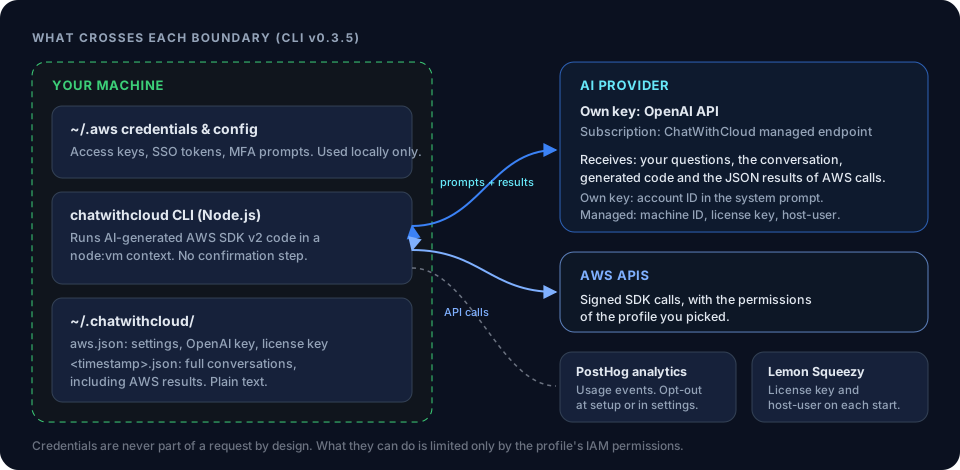
Your AWS credentials stay in ~/.aws and are never copied or uploaded. But the model has to see results to explain them, so your question, the conversation context and the JSON returned by AWS calls are sent for processing: to OpenAI directly if you use your own key, or to ChatWithCloud’s managed endpoint on the trial or subscription.
For a security review, that JSON can include user names, role names, security group IDs and bucket names. Decide whether that’s acceptable before you start, and scope the role accordingly. The ChatWithCloud security model and data flow lists exactly what’s sent and what’s stored locally. If you also use the free converters, the same question is answered in is it safe to paste AWS code into an AI converter.
Troubleshooting security questions
These errors come from the security APIs themselves. For outages and failing services, see how to troubleshoot AWS infrastructure with an AI CLI. If a check fails with AccessDenied, work through how to troubleshoot AWS IAM access denied errors before widening the role, and check the permissions of your currently assumed IAM role to see what the session can actually do.
Credential report errors
ReportInProgress means IAM is still generating the report; ask again after a short wait. ReportNotPresent or ReportExpired means a new report must be generated first, which needs iam:GenerateCredentialReport.
S3 errors that look like findings
A bucket with no Block Public Access configuration returns NoSuchPublicAccessBlockConfiguration, and one with no bucket policy returns NoSuchBucketPolicy from GetBucketPolicyStatus. Neither is an access problem. Ask the model to treat them as “not configured” rather than as failures.
Security group results look incomplete
The session checked one region. Ask again with “in every region”, and confirm it paginated through all rules.
Limits of an AI security review
An AI CLI is a quick way to analyze AWS security posture, but know what it doesn’t cover:
- It’s not continuous compliance, and it doesn’t replace an audit or a security team’s judgment.
- It only checks what you ask about. Missing a question means missing a finding.
- The model can misread results. Verify anything you’ll act on, as shown above.
- It uses AWS SDK for JavaScript v2, which reached end-of-support on 8 September 2025, so newer services and settings may be unreachable.
- If the profile can write, it can change things without asking. Keep it read-only.
Frequently asked questions
Can AI find risky IAM policies from the terminal?
Yes. Ask which principals have AdministratorAccess and which customer managed policies allow * actions on * resources. The generated code reads policy documents with GetPolicyVersion, so the profile needs that permission.
Is ChatWithCloud a replacement for AWS Security Hub?
No. It answers ad-hoc questions at a point in time. Security Hub CSPM runs continuous checks against security standards. Use both: the service for coverage, the CLI for quick explanations and follow-up questions.
What permissions does an AWS security audit in natural language need?
Read-only ones. AWS’s SecurityAudit managed policy is the quick option; the custom policy in this guide is narrower. Never use an admin profile, because changes run without confirmation.
Can I ask AI about AWS security issues without sending secrets?
Your AWS credentials never leave your machine. Query results do, so resource names and configuration details are sent to the model. Scope the role to what you’re willing to share.
Related guides
 ChatWithCloud security modelWhat stays local, what’s sent, and a read-only checklist.
Connect ChatWithCloud to your AWS accountProfiles, SSO and a dedicated read-only role for audits.
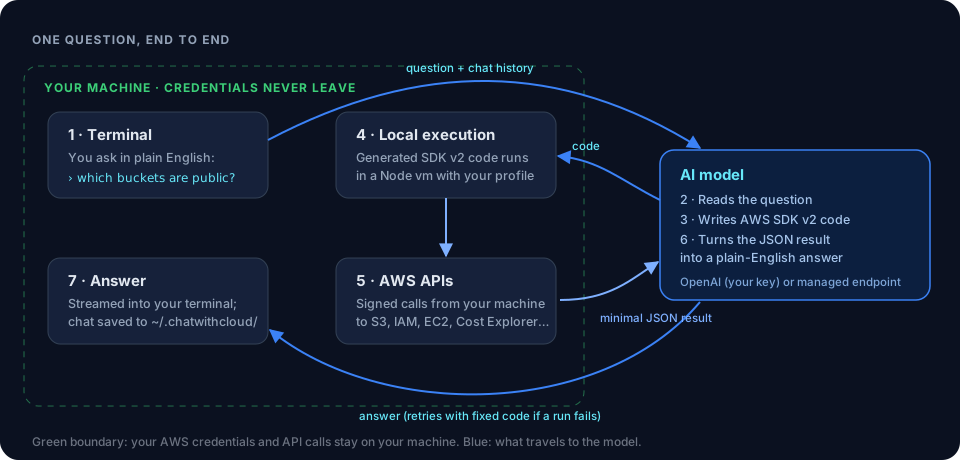 How ChatWithCloud worksThe question-to-code-to-answer loop explained.
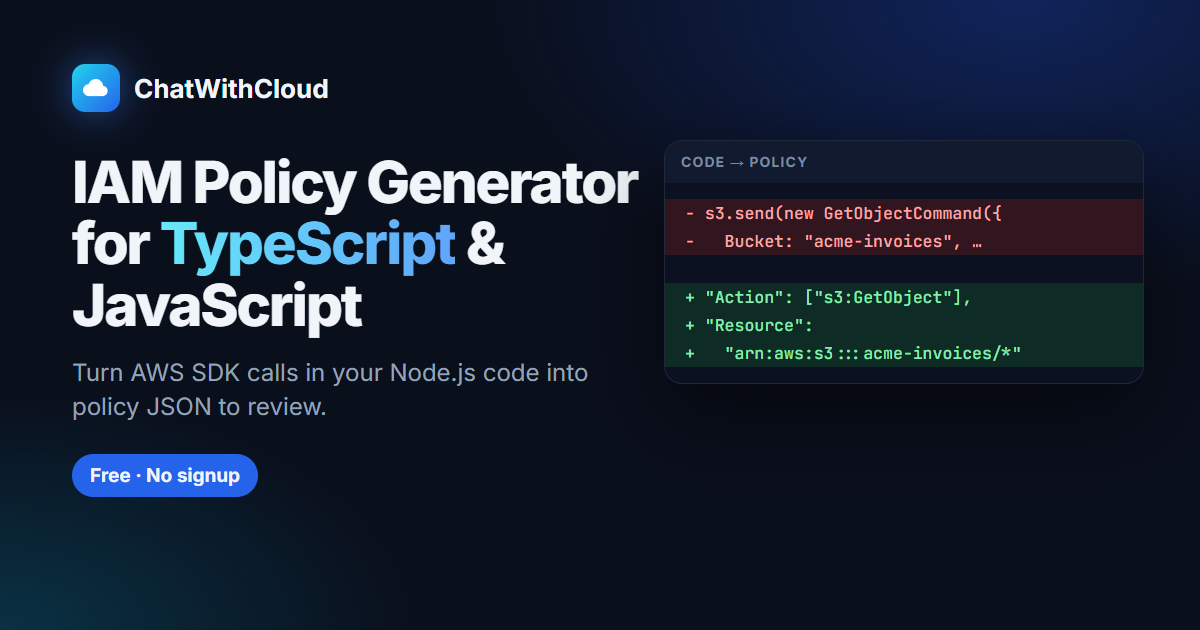 IAM policy generatorDraft least-privilege policies from your SDK code.
Review a Generated IAM Policy for Least PrivilegeA five-pass checklist for turning a generated IAM policy into a least-privilege one.
Ask AI Which S3 Buckets Are LargestFind your biggest and publicly exposed S3 buckets with plain-English questions.
Ask your AWS account in plain English
Your first 15 runs are free, with no OpenAI key needed.
npx chatwithcloud