
Photo by İsmail Enes Ayhan on Unsplash
You can ask AI which S3 buckets are largest by running ChatWithCloud with a read-only AWS profile and typing “Which S3 buckets are largest?” It writes AWS SDK code that reads each bucket’s daily BucketSizeBytes metric from CloudWatch, runs it on your machine and ranks the results. A follow-up such as “Which of them are public?” checks Block Public Access settings and bucket policy status.
This guide is for developers and platform engineers who want a quick answer to two S3 questions that usually take several console pages: where is the data, and is any of it exposed? You’ll see how to ask AI which S3 buckets are largest, which calls sit behind each answer, the permissions to grant, and the AWS CLI commands for checking the result yourself. If the CLI isn’t set up yet, install the ChatWithCloud CLI with npx or Homebrew first.
What can you ask about S3 buckets from the terminal?
ChatWithCloud turns your question into a short AWS SDK for JavaScript v2 script, runs it locally in a Node.js vm context with your profile, and sends only the minimal JSON result back to the model to write the answer. The question-to-SDK-code loop behind every answer is the same for S3 as for any other service. For S3, these questions work well:
- Size ranking: “Which 10 S3 buckets are largest, in GB, with their object counts?”
- Public exposure: “Find public S3 buckets and tell me why each one is public.”
- Account guardrails: “Is S3 Block Public Access turned on at the account level?”
- Configuration: “Query the configuration of bucket
app-uploads: versioning, encryption, lifecycle rules and policy.” - Versioning gaps: “Which buckets don’t have versioning enabled?”
- Objects: “List the 20 largest objects under
logs/2026/inapp-logs.”
S3 is one service among many; for inventory questions across EC2, RDS or Lambda, see how to list AWS resources with natural language from your terminal.
How to ask AI which S3 buckets are largest, step by step
Prerequisites: Node.js, an AWS profile in ~/.aws/config or ~/.aws/credentials with read access to S3 and CloudWatch, and a few minutes. Your first 15 runs are free and don’t need an OpenAI key.
- Start a session with a read-only profileRun
AWS_PROFILE=s3-readonly npx chatwithcloud. Generated code runs without a confirmation step, so a read-only profile is the safe choice for exploring. The walkthrough to connect ChatWithCloud to an AWS SSO profile or role covers the profile picker, SSO and MFA. - Check the regionA session uses one profile and one region (default
us-east-1). S3 bucket names are global, but each bucket’s size metric lives in CloudWatch in the bucket’s own region. If your buckets span regions, name them in the question or start a session per region. - Ask for the ranking with units“Which S3 buckets are largest? Show GB and object count, top 10.” Asking for units and a limit keeps the output short and easy to verify.
- Ask the exposure follow-up“For those 10, which ones are public, and is it the policy, an ACL or missing Block Public Access?” The model keeps the conversation context, so it reuses the bucket list.
- Drill into one bucket“What storage classes does
media-archiveuse, and does it have a lifecycle rule?” This is where size findings turn into cost actions. To put a monthly price on a large bucket, enter its size in the free S3 monthly cost calculator.
Where do the bucket sizes come from?
There are two ways to size a bucket, and they differ a lot in speed and cost. The model normally picks the first, and you can ask for it explicitly.
| Method | How it works | Trade-off |
|---|---|---|
CloudWatch BucketSizeBytes |
Daily storage metric in the AWS/S3 namespace, per bucket and per StorageType (for example StandardStorage), statistic Average |
Fast and cheap, but up to a day old |
CloudWatch NumberOfObjects |
Daily object count with StorageType=AllStorageTypes |
Same freshness as above |
| Listing every object | ListObjectsV2 page by page, summing Size |
Exact now, but slow and billed per LIST request on large buckets |
According to the Amazon S3 documentation, BucketSizeBytes includes current and noncurrent object versions plus the parts of incomplete multipart uploads. That explains a common surprise: a bucket that “should” hold 50 GB reports 400 GB because old versions were never expired. Ask “How much of app-uploads is noncurrent versions?” if versioning is on. For a script that lists the buckets where it’s off, see how to find S3 buckets without versioning.
Note: the storage metric is reported per storage class. A bucket that moved data to Glacier Flexible Retrieval or Intelligent-Tiering tiers has bytes under several StorageType values, so ask for “all storage classes combined” if you want one number per bucket.
An example session: largest buckets, then public ones
This transcript is illustrative and trimmed. Your numbers come from your account and will differ.
$ AWS_PROFILE=s3-readonly npx chatwithcloud

> Which S3 buckets are largest? Top 5, GB and object count, all storage classes.
  1. media-archive      8,412 GB   3.1M objects
  2. app-logs           2,960 GB  41.7M objects
  3. data-lake-raw      1,204 GB   0.9M objects
  4. backups-rds          611 GB   1,240 objects
  5. app-uploads          402 GB   0.6M objects
  Sizes are from yesterday's BucketSizeBytes datapoints.

> Which of these are public, and why?
  Account-level Block Public Access: all four settings ON.
  None of the 5 buckets is public. app-uploads has a bucket policy with
  "Principal": "*" but GetBucketPolicyStatus returns IsPublic=false because
  the statement is limited by aws:SourceVpce.

> Does app-logs have a lifecycle rule?
  No lifecycle configuration found for app-logs.
Two things are worth checking yourself before acting: the date of the metric datapoint, and whether a bucket in another region was left out. From here a natural next step is to ask AI why your AWS bill increased and see how much of the change is S3 storage, or rank every service with a script to find your most expensive AWS service.
How does it decide a bucket is public?
“Public” in S3 has a precise meaning, and a good answer should name which mechanism is involved. Amazon S3 treats an ACL as public if it grants anything to the AllUsers or AuthenticatedUsers groups. A bucket policy is treated as public unless every statement is limited to fixed values such as specific principals, aws:SourceIp ranges, aws:SourceVpc or aws:SourceVpce. Buckets that still depend on ACLs can be moved to policy-only access with the script to find S3 buckets with ACLs enabled and disable them.
Block Public Access (BPA) sits on top of both. It has four settings (BlockPublicAcls, IgnorePublicAcls, BlockPublicPolicy, RestrictPublicBuckets) that apply at the account, bucket and access point level, and S3 enforces the most restrictive combination. New buckets block public access by default, but existing buckets and older accounts may not. The CIS Amazon Web Services Foundations Benchmark recommends turning on S3 Block Public Access, which makes “is BPA on at the account level?” a good first question in any audit.
Behind the answer, the generated code typically calls GetPublicAccessBlock (account and bucket), GetBucketPolicyStatus, which returns IsPublic, and GetBucketAcl. The same three checks are packaged in an SDK v3 script to find public and private S3 buckets without the AI. For a broader review that also covers IAM users, security groups and CloudTrail, use the guide to analyze your AWS security posture with an AI CLI.
Check the same answers with the AWS CLI
AI answers are a starting point, so verify anything you’ll act on. These AWS CLI commands return the raw data behind each answer.
# Yesterday's size of one bucket in S3 Standard (run in the bucket's region)
aws cloudwatch get-metric-statistics \
  --namespace AWS/S3 --metric-name BucketSizeBytes \
  --dimensions Name=BucketName,Value=app-logs Name=StorageType,Value=StandardStorage \
  --start-time 2026-10-24T00:00:00Z --end-time 2026-10-26T00:00:00Z \
  --period 86400 --statistics Average

# Account-level Block Public Access
aws s3control get-public-access-block --account-id 123456789012

# Bucket-level Block Public Access and policy status
aws s3api get-public-access-block --bucket app-uploads
aws s3api get-bucket-policy-status --bucket app-uploads

# Versioning status
aws s3api get-bucket-versioning --bucket app-uploads
If you want this as a repeatable script instead of a conversation, the runnable example to find the size of each S3 bucket and the largest one uses the AWS SDK for JavaScript v3. More scripts like it live in the AWS practical examples hub with TypeScript scripts.
Permissions needed
ChatWithCloud has exactly the permissions of the profile you pick. AWS’s ReadOnlyAccess managed policy covers everything in this guide. For a narrower S3 audit role, this policy allows the size and exposure questions above and nothing that changes data:
{
  "Version": "2012-10-17",
  "Statement": [
    {
      "Sid": "ListBucketsAndAccountSettings",
      "Effect": "Allow",
      "Action": [
        "s3:ListAllMyBuckets",
        "s3:GetAccountPublicAccessBlock"
      ],
      "Resource": "*"
    },
    {
      "Sid": "BucketConfiguration",
      "Effect": "Allow",
      "Action": [
        "s3:GetBucketLocation",
        "s3:GetBucketPolicy",
        "s3:GetBucketPolicyStatus",
        "s3:GetBucketPublicAccessBlock",
        "s3:GetBucketAcl",
        "s3:GetBucketVersioning",
        "s3:GetEncryptionConfiguration",
        "s3:GetLifecycleConfiguration",
        "s3:ListBucket"
      ],
      "Resource": "arn:aws:s3:::*"
    },
    {
      "Sid": "StorageMetrics",
      "Effect": "Allow",
      "Action": [
        "cloudwatch:GetMetricData",
        "cloudwatch:GetMetricStatistics",
        "cloudwatch:ListMetrics"
      ],
      "Resource": "*"
    }
  ]
}
Drop s3:ListBucket if you never want object keys listed. To draft a policy from your own S3 scripts, try the IAM policy generator for TypeScript code, and review what it produces. The ChatWithCloud security model for AWS credentials explains what leaves your machine: your question, the conversation and the JSON returned by AWS calls, never your credentials.
Troubleshooting and common mistakes
- A bucket shows no size. The bucket is in another region than the session, or it’s new and the first daily datapoint hasn’t arrived. Ask again in that bucket’s region.
- Sizes don’t match what you expect. Noncurrent versions and incomplete multipart uploads count toward
BucketSizeBytes. Ask for a per-storage-type breakdown. AccessDeniedonGetBucketPolicyStatusorGetBucketAcl. The profile lacks that action, or a bucket policy explicitly denies it. The error goes back to the model, which may retry, but it can’t grant itself permissions.NoSuchBucketPolicyorNoSuchPublicAccessBlockConfiguration. These are normal: the bucket has no policy, or no bucket-level BPA configuration (the account setting may still apply).- “List all objects” on a huge bucket. Listing millions of keys is slow and each LIST request is billed; see how S3 request costs add up before you run one. Prefer metrics, a prefix, or S3 Inventory for full listings. When you do need every key in code, list all objects in an S3 bucket with the AWS SDK v3 paginator and stream the results.
What it can’t do
- It can be wrong. Check the metric date and the numbers against the CLI commands above before deleting or moving data.
- It doesn’t tell you who downloaded what. Object-level access needs server access logs or CloudTrail data events, which you’d have to enable first.
- The generated code uses AWS SDK for JavaScript v2, which reached end-of-support on 8 September 2025, so S3 features launched after that may not be queryable.
- It won’t stop a write. “Turn on Block Public Access for every bucket” will run on a profile that allows it, with no confirmation step.
Frequently asked questions
Can I find public S3 buckets with natural language?
Yes. Ask “Which S3 buckets are public, and why?” A useful answer names the reason for each bucket: a public policy, a public ACL, or Block Public Access turned off. If every bucket is private, it should say so and show the account-level BPA result.
How fresh are the bucket sizes?
The BucketSizeBytes metric is reported once a day, so sizes can be up to a day old. For an exact current number on a small bucket, ask it to list the objects and sum their sizes.
Can I query S3 bucket configuration from the terminal without AI?
Yes. The aws s3api get-bucket-* commands return each setting, and the SDK v3 example linked above sizes every bucket in a script. The AI CLI saves you from stitching those calls together yourself.
Does it read the contents of my objects?
Only if you ask a question that requires it and the profile allows s3:GetObject. Size and exposure questions use metadata, metrics and bucket settings. Leave s3:GetObject out of the policy to rule it out.
Related guides
Analyze AWS security posture with an AI CLIGo beyond S3: IAM, security groups and logging.
 S3 bucket size script with SDK v3The same size ranking as a TypeScript script.
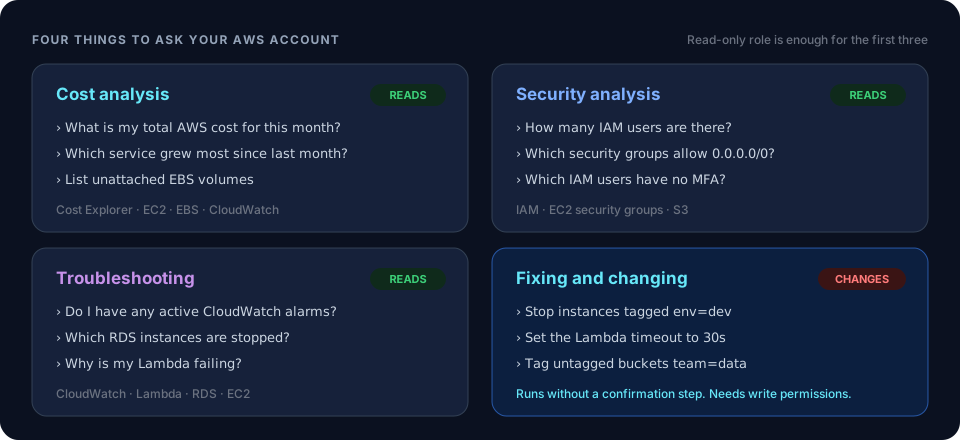 ChatWithCloud use cases by teamMore cost, security and inventory questions.
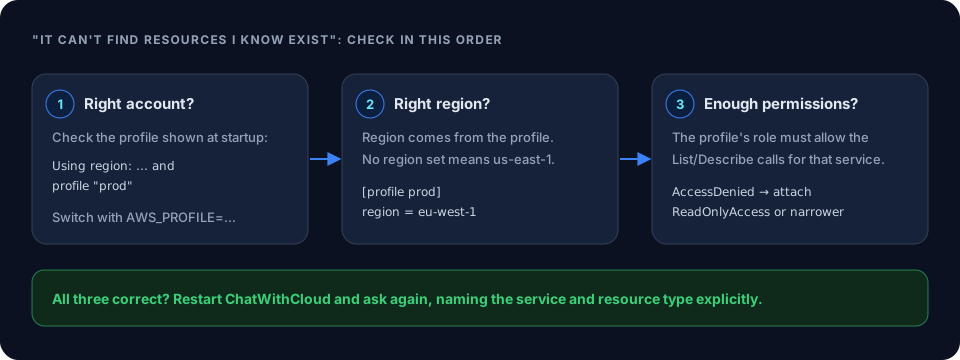 ChatWithCloud FAQ on profiles and regionsAnswers about sessions, pricing and data handling.
How to Calculate S3 GET and PUT Request CostsPer-1,000 S3 request pricing explained.
Ask AI Why Your AWS Bill IncreasedA walkthrough of diagnosing an AWS bill increase with plain-English questions.
Ask your AWS account in plain English
Your first 15 runs are free, with no OpenAI key needed.
npx chatwithcloud