
Photo by Ales Nesetril on Unsplash
To upload a file to S3 with AWS SDK v3 in TypeScript, create an S3Client and send a PutObjectCommand with Bucket, Key, Body and ContentType. That’s the right call for small files. For large files or streams, use the Upload class from @aws-sdk/lib-storage, which splits the file into parts and uploads them in parallel.
This example is for Node.js developers who need a dependable way to put local files into S3: build artifacts, exports, backups or user files your server already holds. You’ll get one TypeScript script that picks the right method by file size, the IAM policy it needs, sample output with progress reporting, and fixes for the errors you’re likely to see first. If those files are served through CloudFront, the guide to CloudFront invalidation with AWS SDK v3 (CreateInvalidation) shows how to clear the cached copies after an upload. If some of those files are scanned documents, the guide to extract text from uploaded PDFs and images with Amazon Textract picks up where the upload ends.
It’s part of our library of AWS SDK v3 practical examples for TypeScript. If the file lives on a user’s device rather than your server, have the client upload directly instead: see how to create a presigned S3 upload URL with AWS SDK v3. If you need to limit the file size or type as well, use an S3 presigned POST with AWS SDK v3.
PutObjectCommand or lib-storage Upload: which should you use?
PutObjectCommand |
Upload (@aws-sdk/lib-storage) |
|
|---|---|---|
| Best for | Small files, buffers and strings | Large files, streams of unknown length |
| Requests | One | Multipart: create, one per part, complete |
| Memory | Whole body in memory (as a buffer) | About partSize × queueSize |
| Retry on failure | Whole file again | Only the failed part |
| Progress events | No | Yes, httpUploadProgress |
A single PutObject request is limited to 5 GB, according to AWS documentation, and in practice multipart is faster and more reliable well before that. The script switches at 100 MiB; change MULTIPART_THRESHOLD to suit your network. For stdin, gzip output or HTTP bodies of unknown length, the example to upload large files and streams to S3 with AWS SDK v3 adds the part-size math and cleanup of incomplete multipart uploads.
Prerequisites
- Node.js 18 or later, npm and
tsx. @aws-sdk/client-s3and@aws-sdk/lib-storage. The lib-storage package in the aws-sdk-js-v3 GitHub repository documents everyUploadoption.- An existing bucket and an AWS profile or role allowed to write to it.
AWS SDK v3 S3 upload IAM permissions
Multipart uploads are authorized by s3:PutObject (it covers creating the upload, sending parts and completing it). Add s3:AbortMultipartUpload so a failed upload can clean up its parts. Scope both to the objects, not the bucket (replace my-bucket, and narrow /* to a prefix if you can):
{
  "Version": "2012-10-17",
  "Statement": [
    {
      "Sid": "UploadObjects",
      "Effect": "Allow",
      "Action": [
        "s3:PutObject",
        "s3:AbortMultipartUpload"
      ],
      "Resource": "arn:aws:s3:::my-bucket/*"
    }
  ]
}
If the bucket encrypts with a customer managed KMS key, add kms:GenerateDataKey and kms:Decrypt on that key (multipart uploads need both). Adding Tagging to the upload also requires s3:PutObjectTagging. To check your own variant, paste it into the free IAM policy generator for TypeScript.
The full script: upload a file to S3 with the AWS SDK v3 in TypeScript
// upload-file.ts
// Uploads a local file to S3. Small files go up in one PutObject call;
// large files are streamed as a multipart upload with @aws-sdk/lib-storage.
import { S3Client, PutObjectCommand } from "@aws-sdk/client-s3";
import { Upload } from "@aws-sdk/lib-storage";
import { createReadStream } from "node:fs";
import { readFile, stat } from "node:fs/promises";
import { basename, extname } from "node:path";

const region = process.env.AWS_REGION ?? "us-east-1";
const s3 = new S3Client({ region });

const MULTIPART_THRESHOLD = 100 * 1024 * 1024; // 100 MiB
const PART_SIZE = 10 * 1024 * 1024; // 10 MiB (S3's minimum part size is 5 MiB)

const CONTENT_TYPES: Record<string, string> = {
  ".json": "application/json",
  ".csv": "text/csv",
  ".txt": "text/plain",
  ".html": "text/html",
  ".png": "image/png",
  ".jpg": "image/jpeg",
  ".jpeg": "image/jpeg",
  ".pdf": "application/pdf",
  ".zip": "application/zip",
};

function contentTypeFor(path: string): string {
  return CONTENT_TYPES[extname(path).toLowerCase()] ?? "application/octet-stream";
}

// Buffer upload: reads the whole file into memory and sends one request.
async function putSmallFile(bucket: string, key: string, path: string): Promise<string | undefined> {
  const body = await readFile(path);
  const res = await s3.send(
    new PutObjectCommand({ Bucket: bucket, Key: key, Body: body, ContentType: contentTypeFor(path) }),
  );
  return res.ETag;
}

// Stream upload: bounded memory, parts sent in parallel, each part retried on its own.
async function uploadLargeFile(
  bucket: string,
  key: string,
  path: string,
  size: number,
): Promise<string | undefined> {
  const upload = new Upload({
    client: s3,
    params: {
      Bucket: bucket,
      Key: key,
      Body: createReadStream(path),
      ContentType: contentTypeFor(path),
    },
    partSize: PART_SIZE,
    queueSize: 4, // parts in flight at the same time
    leavePartsOnError: false, // abort the multipart upload if a part fails
  });

  upload.on("httpUploadProgress", (progress) => {
    const done = progress.loaded ?? 0;
    process.stdout.write(`\r  ${((done / size) * 100).toFixed(1)}% (${done} of ${size} bytes)`);
  });

  const res = await upload.done();
  process.stdout.write("\n");
  return res.ETag;
}

async function main(): Promise<void> {
  const [path, bucket, keyArg] = process.argv.slice(2);
  if (!path || !bucket) {
    console.error("Usage: npx tsx upload-file.ts <local-file> <bucket> [key]");
    process.exit(1);
  }
  const key = keyArg ?? basename(path);
  const { size } = await stat(path);

  console.log(`Uploading ${path} (${size} bytes) to s3://${bucket}/${key}`);
  const etag =
    size < MULTIPART_THRESHOLD
      ? await putSmallFile(bucket, key, path)
      : await uploadLargeFile(bucket, key, path, size);
  console.log(`Done. ETag: ${etag}`);
}

main().catch((err) => {
  console.error(err);
  process.exit(1);
});
How the buffer upload works
putSmallFile reads the file with readFile and passes the Buffer as Body. The same call accepts a string or Uint8Array, which is how you upload a buffer to S3 with AWS SDK v3 when the data is generated in memory, such as a JSON export. Setting ContentType matters: without it S3 stores application/octet-stream and browsers download the file instead of displaying it. To read the file back in Node.js, the guide to read an S3 object with AWS SDK v3 using transformToString turns the streamed Body into text or bytes.
How the stream upload works
uploadLargeFile passes a stream from createReadStream to Upload. It reads 10 MiB parts, keeps four in flight, and reports progress. S3 allows up to 10,000 parts per upload, so with 10 MiB parts the largest file is about 97 GiB; raise partSize for anything bigger. The Node.js fs module documentation for createReadStream covers options like highWaterMark and reading a byte range with start and end.
How do you run it?
npm install @aws-sdk/client-s3 @aws-sdk/lib-storage
npm install --save-dev tsx typescript @types/node

AWS_PROFILE=deploy AWS_REGION=us-east-1 npx tsx upload-file.ts ./dist/site.zip my-bucket releases/site.zip
Sample output
Uploading ./report.csv (48213 bytes) to s3://my-bucket/report.csv
Done. ETag: "9b2cf535f27731c974343645a3985328"

Uploading ./dist/site.zip (734003200 bytes) to s3://my-bucket/releases/site.zip
  100.0% (734003200 of 734003200 bytes)
Done. ETag: "3f1a7c2e9b04d58a61e0c7b2d4f9a813-70"
The -70 suffix on the second ETag shows a multipart upload with 70 parts. Multipart ETags aren’t an MD5 of the file, so don’t compare them with a local checksum.
Troubleshooting common S3 upload errors
AccessDenied. The identity lackss3:PutObjecton that key, a bucket policy denies it (for example, one that requires encryption headers), or the KMS key policy doesn’t allow the caller.PermanentRedirectorAuthorizationHeaderMalformed. The client’s region doesn’t match the bucket’s. SetAWS_REGIONto the bucket’s region.NoSuchBucket. A typo in the bucket name, or the bucket is in a different account than your profile.- Upload hangs or runs out of memory. A large file went through
PutObjectCommand. Use theUploadpath, or lowerqueueSizeon small machines. - Storage keeps growing after failed uploads. Parts of abandoned multipart uploads are stored and billed until aborted. Keep
leavePartsOnError: falseand add a lifecycle rule that aborts incomplete multipart uploads after a few days.
If storage is growing and you don’t know why, the example that shows how to find the size of each S3 bucket and the largest one helps, and so does the guide to ask AI why your AWS bill went up. To put a monthly figure on that storage, try the free AWS S3 pricing calculator.
Migrating an upload from SDK v2?
In v2, s3.upload() handled multipart automatically and s3.putObject() sent one request. In v3 those become Upload from lib-storage and PutObjectCommand, and the client is modular, so you install only @aws-sdk/client-s3. The free AWS SDK JS v2 to v3 converter rewrites these calls for you, and the plan to migrate a Node.js app from AWS SDK v2 to v3 covers the rest of an application. Strip credentials first, as explained in is it safe to paste AWS code into an AI converter.
Ask ChatWithCloud instead
Uploads belong in your code, but questions about the bucket don’t need a script. Ask ChatWithCloud “Which buckets in this account have a lifecycle rule for incomplete multipart uploads?” and it writes AWS SDK for JavaScript v2 code, runs it locally with your AWS profile, and explains the result. It handles inventory questions like the ones in the guide to list AWS resources in plain English from your terminal. Changes run without a confirmation step, so connect ChatWithCloud to a read-only AWS profile for exploring, and see how the ChatWithCloud CLI works end to end.
Frequently asked questions
How do I upload a stream to S3 with Node.js SDK v3?
Pass the stream as Body to new Upload({ client, params }) from @aws-sdk/lib-storage and await upload.done(). PutObjectCommand needs a known content length, so it isn’t a good fit for streams of unknown size.
What’s the S3Client PutObjectCommand file upload example in one line?
await s3.send(new PutObjectCommand({ Bucket, Key, Body: await readFile(path), ContentType })). The full script above adds content-type detection and the multipart path.
Do I need s3:ListBucket to upload?
No. Uploading needs s3:PutObject on the object ARN. s3:ListBucket is only needed if your code also lists or checks for existing keys, as when you check if an S3 object exists in TypeScript with HeadObject.
Can I cancel an upload in progress?
Yes. Call upload.abort() on the Upload instance. With leavePartsOnError: false the multipart upload is aborted and its parts are removed.
Related guides
 Presigned S3 upload URLs with SDK v3Let browsers upload directly without AWS credentials.
- Find the size of every S3 bucketCloudWatch BucketSizeBytes plus an exact object count.
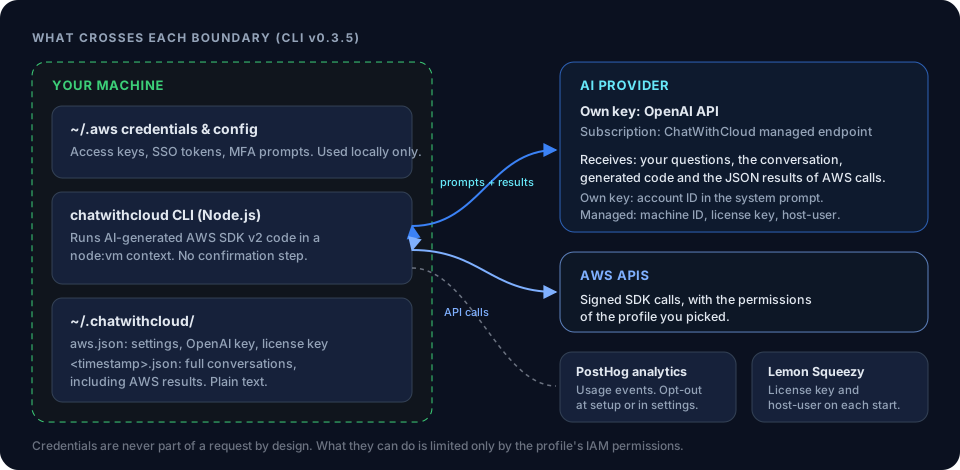 How ChatWithCloud handles your AWS dataWhat stays on your machine and what is sent to the model.
Calculate S3 PUT and GET request costsEstimate what your upload traffic costs in requests.
AWS S3 Data Transfer Out CostHow S3 internet egress is priced.
S3 Free Tier CostThe S3 free tier changed in 2025.
Ask your AWS account in plain English
Your first 15 runs are free, with no OpenAI key needed.
npx chatwithcloud