
Photo by Florian Olivo on Unsplash
To create a presigned S3 download URL with AWS SDK v3, build a GetObjectCommand for the bucket and key, then pass it to getSignedUrl from @aws-sdk/s3-request-presigner with an expiresIn value in seconds. The URL carries a SigV4 signature made with your credentials, so anyone holding it can download that one object until it expires, for up to 7 days.
This guide is for Node.js and TypeScript developers who need to hand out temporary S3 download links: invoices, exports, user uploads. You’ll create a presigned S3 download URL with AWS SDK v3 in a complete script, choose a safe expiry, force a download filename, grant the signer the right permissions and fix the 403 errors people hit most. For the upload direction, see the companion example to create a presigned S3 upload URL with SDK v3. If your own server needs the file’s contents instead of a link, read the S3 object with GetObjectCommand in AWS SDK v3 directly.
How does a presigned S3 download URL work?
By default every S3 object is private. A presigned URL adds query parameters (X-Amz-Algorithm, X-Amz-Credential, X-Amz-Date, X-Amz-Expires, X-Amz-Signature and, for temporary credentials, X-Amz-Security-Token) that prove the request was authorized by whoever signed it. Signing happens locally; no request is sent to S3 when you create the URL.
Three consequences follow from that design, all documented by Amazon S3:
- The URL has the permissions of the principal that signed it. If that principal can’t read the object, the URL returns
403even though it was created without error. - It is a bearer token. Anyone with the link can use it, as many times as they like, until it expires. Treat it like a password.
- S3 checks expiry when a request starts. A large download that begins before the deadline finishes, but a retry after the deadline fails.
Prerequisites
- Node.js 18 or later and a TypeScript runner such as
tsx. - The packages
@aws-sdk/client-s3and@aws-sdk/s3-request-presigner. - Credentials for a principal with
s3:GetObjecton the object (details in the permissions section), and the bucket’s region set viaAWS_REGIONor your profile.
If you’re moving from v2’s s3.getSignedUrl('getObject', …), the free AWS SDK v2 to v3 converter gives you a first draft to review. Porting a Python service that uses generate_presigned_url? Try the boto3 to AWS SDK for JavaScript v3 converter, and see how to port a Python boto3 script to Node.js with SDK v3 for credentials, regions and error handling.
How to create a presigned S3 download URL with AWS SDK v3
- Install the two packagesRun
npm install @aws-sdk/client-s3 @aws-sdk/s3-request-presigner. The presigner is a separate package in v3. - Create the client in the bucket’s regionA URL signed for the wrong region fails with an authorization error, so set
regionorAWS_REGIONto where the bucket lives. - Check the object existsA
HeadObjectCommandcall catches missing keys and missing permissions before you hand a broken link to a user. - Build a
GetObjectCommandAddResponseContentDispositionorResponseContentTypeif you want S3 to override those headers in the response. - Sign it with an explicit expiryCall
getSignedUrl(client, command, { expiresIn }). If you omitexpiresIn, the presigner defaults to 900 seconds (15 minutes).
Here is the complete script. It exports a reusable function for your API and has a small CLI entry point for testing.
import { S3Client, GetObjectCommand, HeadObjectCommand } from "@aws-sdk/client-s3";
import { getSignedUrl } from "@aws-sdk/s3-request-presigner";

// SigV4 presigned URLs can't live longer than 7 days.
const MAX_EXPIRES_IN = 7 * 24 * 60 * 60;

interface DownloadLinkOptions {
  bucket: string;
  key: string;
  expiresIn?: number;
  downloadName?: string;
}

const client = new S3Client({});

function contentDisposition(fileName: string): string {
  // ASCII fallback for old clients, UTF-8 filename* for everyone else.
  const ascii = fileName.replace(/[^\x20-\x7e]/g, "_").replace(/["\\]/g, "_");
  const utf8 = encodeURIComponent(fileName).replace(
    /['()*]/g,
    (c) => "%" + c.charCodeAt(0).toString(16).toUpperCase(),
  );
  return `attachment; filename="${ascii}"; filename*=UTF-8''${utf8}`;
}

export async function createDownloadUrl(opts: DownloadLinkOptions): Promise<string> {
  const expiresIn = opts.expiresIn ?? 900;
  if (!Number.isInteger(expiresIn) || expiresIn < 1 || expiresIn > MAX_EXPIRES_IN) {
    throw new Error(`expiresIn must be an integer from 1 to ${MAX_EXPIRES_IN} seconds`);
  }

  // Fails with NotFound (404) or Forbidden (403) before a bad link is shared.
  await client.send(new HeadObjectCommand({ Bucket: opts.bucket, Key: opts.key }));

  const fileName = opts.downloadName ?? opts.key.split("/").pop() ?? "download";
  const command = new GetObjectCommand({
    Bucket: opts.bucket,
    Key: opts.key,
    ResponseContentDisposition: contentDisposition(fileName),
  });

  return getSignedUrl(client, command, { expiresIn });
}

async function main(): Promise<void> {
  const [bucket, key, seconds] = process.argv.slice(2);
  if (!bucket || !key) {
    console.error("Usage: npx tsx presign-download.ts <bucket> <key> [expiresInSeconds]");
    process.exit(1);
  }
  const url = await createDownloadUrl({
    bucket,
    key,
    expiresIn: seconds ? Number(seconds) : undefined,
  });
  console.log(url);
}

main().catch((err: unknown) => {
  const e = err as { name?: string; message?: string };
  console.error(`${e.name ?? "Error"}: ${e.message ?? String(err)}`);
  process.exit(1);
});
Run it and test the link with curl. The -OJ flags save the file under the name from Content-Disposition:
npm install @aws-sdk/client-s3 @aws-sdk/s3-request-presigner
AWS_PROFILE=app AWS_REGION=eu-west-1 npx tsx presign-download.ts invoices-prod 2026/10/INV-1042.pdf 3600

# Output (shortened):
# https://invoices-prod.s3.eu-west-1.amazonaws.com/2026/10/INV-1042.pdf?X-Amz-Algorithm=AWS4-HMAC-SHA256
#   &X-Amz-Credential=...&X-Amz-Date=20261027T091500Z&X-Amz-Expires=3600
#   &X-Amz-Signature=...&X-Amz-SignedHeaders=host&response-content-disposition=attachment%3B...

curl -OJ "https://invoices-prod.s3.eu-west-1.amazonaws.com/2026/10/INV-1042.pdf?X-Amz-..."
More runnable S3 and Lambda scripts live in the AWS practical examples hub for SDK v3.
How long can a presigned download URL last?
You set the expiration on a presigned S3 download URL with expiresIn, but the credentials you sign with can cut it short. A URL stops working at its own expiry or when the signing credentials expire, whichever comes first.
| Signed with | Longest it works |
|---|---|
| IAM user access keys, SDK or CLI | 7 days (604,800 seconds), the SigV4 maximum |
| S3 console | 1 minute to 12 hours |
IAM role session (AssumeRole, SSO) |
Until the role session ends (1 hour by default for AssumeRole) |
| EC2 instance profile | Until the rotating role credentials expire (typically about 6 hours) |
| Lambda or ECS task role | Until those temporary credentials expire |
If you pass more than 604,800 seconds, SDK v3 rejects it with “Signature version 4 presigned URLs must have an expiration date less than one week in the future”. In practice, keep download links short (5 to 60 minutes) and generate a fresh one each time a user clicks, rather than storing long-lived URLs in a database. If you hand out many download links, estimate the S3 data transfer out cost of those downloads too. A bucket policy with the s3:signatureAge condition key can enforce a maximum age on every presigned request.
How do you force a download filename?
GetObject accepts response-override parameters: ResponseContentDisposition, ResponseContentType, ResponseCacheControl, ResponseContentLanguage, ResponseContentEncoding and ResponseExpires. S3 only honors them on signed requests, which a presigned URL is. They’re signed into the URL, so a user can’t change them without breaking the signature.
Set ResponseContentDisposition to attachment to make browsers save the file instead of opening it, or to inline to display PDFs and images in the tab. The filename parameter is limited to ASCII, so the script also sends filename* with UTF-8 percent-encoding for names like Résumé.pdf. The MDN reference for the Content-Disposition header covers both forms and how browsers pick between them.
Tip: the override doesn’t change the stored object. If every download of an object should use the same headers, set ContentDisposition and ContentType when you upload it instead.
The AWS CLI shortcut: aws s3 presign
For a one-off link you don’t need code. The AWS CLI signs a GET URL locally:
aws s3 presign s3://invoices-prod/2026/10/INV-1042.pdf --expires-in 3600 --region eu-west-1The default is 3,600 seconds and the maximum is 604,800. The CLI command has no option for response overrides such as Content-Disposition, which is one reason to use the SDK in application code.
IAM permissions the signer needs
The principal that signs the URL needs s3:GetObject on the object ARN. HeadObject in the script uses the same permission. Add s3:ListBucket on the bucket if you want a missing key to return 404 Not Found; without it, S3 returns 403 Access Denied for missing keys, which makes debugging harder. The example to check if an S3 object exists with HeadObjectCommand tells a real 404 apart from that 403.
{
  "Version": "2012-10-17",
  "Statement": [
    {
      "Sid": "ReadInvoiceObjects",
      "Effect": "Allow",
      "Action": "s3:GetObject",
      "Resource": "arn:aws:s3:::invoices-prod/*"
    },
    {
      "Sid": "DistinguishMissingKeys",
      "Effect": "Allow",
      "Action": "s3:ListBucket",
      "Resource": "arn:aws:s3:::invoices-prod"
    }
  ]
}
If objects use SSE-KMS with a customer managed key, the signer also needs kms:Decrypt on that key, allowed in both its IAM policy and the key policy. Scope the s3:GetObject resource to a prefix (for example invoices-prod/public-exports/*) so a bug in your key handling can’t sign URLs for everything. To draft a policy from existing code, paste it into the IAM policy generator for TypeScript AWS code and tighten the result.
Troubleshooting S3 signed download link Access Denied
Open the failing URL with curl to read S3’s XML error. The Code and Message tell you which case you’re in.
| Error | Likely cause | Fix |
|---|---|---|
AccessDenied, “Request has expired” |
The URL’s expiry passed, or the clock on the signing machine is wrong | Generate a new URL; sync the server clock with NTP |
AccessDenied on a fresh URL |
Signer lacks s3:GetObject, a bucket policy denies it, or the key doesn’t exist and the signer lacks s3:ListBucket |
Check the signer’s policies and the bucket policy; confirm the key with HeadObject |
ExpiredToken |
The temporary credentials used to sign have expired | Refresh credentials before signing; lengthen the role session if needed |
SignatureDoesNotMatch |
The URL was altered (re-encoded, truncated, header added) or a proxy changed the request | Pass the URL through untouched; test without the proxy |
AuthorizationQueryParametersError |
Signed for a different region than the bucket’s | Create the client in the bucket’s region |
AccessDenied on KMS-encrypted objects |
Signer lacks kms:Decrypt on the key |
Allow it in the IAM policy and the key policy |
When the cause isn’t obvious, check the whole chain: who signed, what their identity policies allow, the bucket policy and the KMS key policy. Block Public Access settings don’t block presigned URLs, because the request is signed by a principal in your account rather than made anonymously. The step-by-step guide to troubleshoot AWS infrastructure with an AI CLI shows how to walk that chain with follow-up questions.
Where ChatWithCloud fits
ChatWithCloud is a command-line tool that answers questions about your AWS account in plain English. It isn’t a URL generator for production, and you shouldn’t paste presigned URLs into any chat, since they work like passwords. Where it saves time is the diagnosis: with a read-only profile you can ask “Does invoices-prod have a bucket policy that denies s3:GetObject?”, “Which KMS key encrypts 2026/10/INV-1042.pdf?” or “What policies are attached to the role api-prod?” and get the answer from the live account.
It writes AWS SDK code, runs it on your machine and sends only the JSON result to the model; the security overview of what ChatWithCloud sends covers the details. Set it up with the guide to connect ChatWithCloud to your AWS profiles and roles, and for a wider check of bucket exposure, analyze your AWS security posture from the terminal. Keep in mind that it can be wrong, and generated code runs without a confirmation step, so use a read-only profile.
Frequently asked questions
What is the default expiry of getSignedUrl in SDK v3?
900 seconds (15 minutes) if you don’t pass expiresIn. The AWS CLI’s aws s3 presign defaults to 3,600 seconds. Both cap at 604,800 seconds (7 days).
Why does my presigned URL expire before the time I set?
It was signed with temporary credentials, such as a role session, SSO or an instance profile. The URL dies when those credentials expire. Sign with credentials that outlive the URL, or keep URLs short and generate them on demand.
Can I generate a temporary S3 download link in Node.js without the presigner package?
Not with the high-level SDK: in v3, presigning lives in @aws-sdk/s3-request-presigner. It’s a small dependency and handles SigV4 query signing for you, so there’s little reason to hand-roll it.
Can I revoke a presigned URL?
Not individually. You can invalidate it by removing the signer’s s3:GetObject permission, deactivating the access key or revoking the role session. Short expiry times are the practical control.
Related guides
 Presigned S3 upload URL with SDK v3The PUT side: let users upload without AWS credentials.
 List AWS resources with natural languageFind buckets, keys and roles without the console.
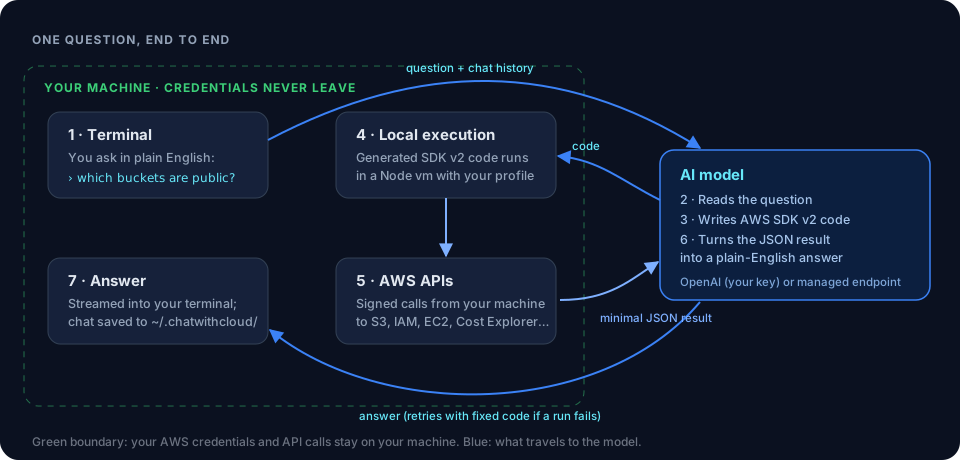 How ChatWithCloud turns questions into SDK callsWhat runs on your machine and what goes to the model.
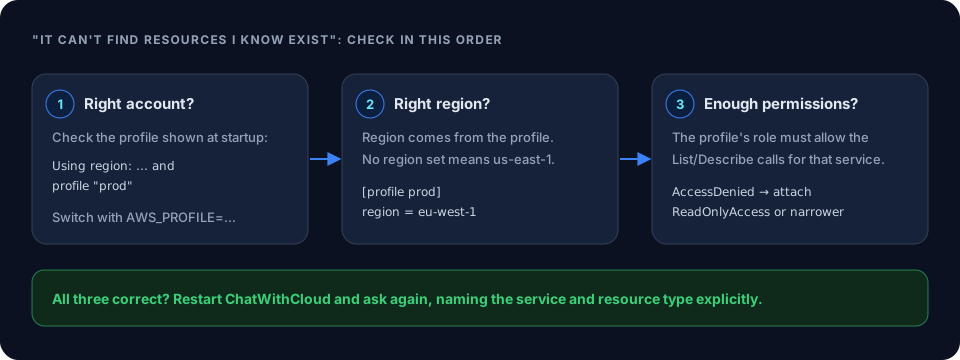 Frequently asked ChatWithCloud questionsProfiles, regions, pricing and data handling.
How to calculate S3 GET request costsEstimate what download requests add to your bill.
AWS S3 Data Transfer Out CostHow S3 internet egress is priced.
Ask your AWS account in plain English
Your first 15 runs are free, with no OpenAI key needed.
npx chatwithcloud