Practical AWS SDK for JavaScript Examples
25 working Node.js and TypeScript scripts for everyday AWS jobs: find where your money goes, clean up idle resources, work with S3, check IAM and security groups, and troubleshoot EC2, Route 53 and CloudFront. Each guide explains the code, shows the expected output, lists the caveats and includes the IAM policy the script needs.
All practical AWS examples
Cost optimization 53
Query Cost Explorer for last month’s unblended cost, grouped by service.
Find your most expensive AWS servicePull a monthly cost and usage report grouped by service to see where spend goes.
Get this month’s CloudWatch costTotal the month-to-date unblended cost of CloudWatch alone.
Detect and stop underutilized EC2 instancesCheck 24 hours of CPU utilization for running instances and stop those under 20%.
Find and tag unattached EBS volumesList volumes with no attachments and tag them for review, without deleting anything.
Release unassociated Elastic IP addressesFind Elastic IPs that aren’t attached to an instance and release them.
Clean up AMIs and snapshots older than 30 daysDeregister private AMIs older than 30 days and delete their snapshots.
Find overprovisioned DynamoDB capacityCompare a table’s provisioned read and write capacity with last month’s consumption.
Find EC2 Reserved Instances about to expireList active Reserved Instances ending in the next 30 days, before on-demand rates kick in.
Set retention on CloudWatch log groups that never expireFind log groups kept forever, ranked by stored GB, and set a retention period on them.
Find idle NAT gatewaysReport NAT gateways with no routes or no traffic in 14 days, and what each one costs.
Find unused load balancersFlag ALBs and NLBs with no targets, no healthy targets or no traffic, with their hourly cost.
Find and delete old RDS manual snapshotsList manual RDS and Aurora snapshots past an age limit; delete only with --delete --apply.
Flag RDS instances with zero DatabaseConnections in 14 days and estimate their monthly cost.
Find ECR repos without a lifecycle policy, estimate the savings and set one with --apply.
Find alarms stuck in INSUFFICIENT_DATA on deleted metrics; delete them with --apply.
List ENIs with status available, skip service-managed ones, delete yours with --apply.
Find interface VPC endpoints with zero BytesProcessed in 14 days and their hourly cost.
List resources missing required tag keys in each Region with GetResources, plus CSV export.
Create a monthly cost budget with ACTUAL/FORECASTED email or SNS alerts; safe to re-run.
Find EBS snapshots whose volume is gone and no AMI uses; archive or delete behind --apply.
Caches with zero GetTypeCmds/SetTypeCmds in 14 days, node-based and serverless.
Savings Plans coverage by month, uncovered On-Demand spend by service, utilization and AWS’s recommendation.
Find unused Secrets Manager secretsList secrets nobody retrieved in 90 days via LastAccessedDate; schedule deletion safely.
Average up to 90 days of Spot prices per Availability Zone and compare the cheapest zone with On-Demand.
Find overprovisioned EBS IOPS on io1 and io2Compare io1/io2 provisioned IOPS with 14-day peaks and price the cut.
Find EFS file systems with no lifecycle policy and set IA/Archive transitions.
Find tables with zero reads and writes in 30 days and price their storage and provisioned capacity.
Find and delete unused CloudWatch dashboardsList dashboards past the free tier, flag stale ones and delete them behind --apply.
Find real-time endpoints with no invocations in N days and delete them behind --apply.
Flag clusters with no connections in 14 days and compare pausing with a final snapshot.
Find idle OpenSearch Service domainsFind domains with no search or indexing traffic in 14 days and what they cost to keep.
Find and abort incomplete S3 multipart uploadsSize the hidden parts of abandoned multipart uploads per bucket and abort old ones with --apply.
Find log groups with no data or no recent events, including ones left by deleted Lambda functions.
Find idle Amazon EMR clustersFlag clusters idle for hours and set an auto-termination policy with --apply.
Find WorkSpaces with no recent logins and switch them to AutoStop with --apply.
List clusters past standard support, their end dates and the extra hourly cost until you upgrade.
Find RDS databases on extended supportFind instances and clusters on engine versions that incur Extended Support charges, with their dates.
Find unused Transit Gateway attachmentsFind attachments with no traffic in 30 days and what each one costs per month.
Find idle AWS DMS replication instancesFind replication instances with no running tasks and delete empty ones with --apply.
Find repositories with no pulls or pushes in N days, size their storage and delete them with --apply.
Find streams with no records in or out for 14 days and what their shards and retention cost.
Find idle Amazon MSK clustersFlag Kafka clusters with no traffic in 14 days and price their brokers and storage.
Find idle Amazon FSx file systemsFind FSx file systems with no reads or writes in 14 days and what they cost to keep.
Find EBS snapshots to move to the archive tierFind old snapshots worth archiving, estimate the saving and move them with --apply.
Find proxies with no client connections in 14 days and delete them with --apply.
Find environments with no traffic, list what they run and terminate them with --apply.
Pull Compute Optimizer findings and estimated monthly savings for every EC2 instance.
Find idle SageMaker notebook instancesFind notebook instances left running and stop them with --apply.
List Fargate services on on-demand capacity and estimate what Fargate Spot would save.
Find unused EC2 capacity reservationsFind capacity reservations with unused slots and what they cost, and cancel them with --apply.
Find Dedicated Hosts running no instances and release empty ones with --apply.
Measure how much of each versioned bucket is old versions and delete markers, and the lifecycle fix.
Amazon S3 9
Upload content with PutObjectCommand from @aws-sdk/client-s3.
Generate a time-limited upload URL with getSignedUrl, so clients can upload without AWS keys.
Use headObject to test for an object without downloading it, and handle NotFound.
Read the free daily BucketSizeBytes metric for every bucket and find the largest.
Check the versioning status of every bucket and return the ones that aren’t versioned.
Upload large files and streams to S3Multipart uploads with Upload from @aws-sdk/lib-storage: part size, progress and aborts.
List S3 buckets with no lifecycle rules, sized from CloudWatch, and add a multipart cleanup rule.
Find S3 buckets that don’t require HTTPSCheck each bucket policy for an aws:SecureTransport deny; add it with --apply.
Find buckets with ACLs still on and switch them to Bucket owner enforced where it’s safe.
Security & IAM 67
Inspect each bucket’s ACL for grants to all users or all authenticated users.
Find security groups open on common portsFlag security group rules that allow overly broad access to a list of common ports.
See the permissions of your current IAM roleUse STS GetCallerIdentity to find the assumed role, then read its policy from IAM.
Flag console IAM users with no MFA device using ListUsers, GetLoginProfile and ListMFADevices.
Find access keys older than 90 days or unused for 45, with a dry-run --deactivate flag.
Find unencrypted EBS volumes in every Region and turn on EnableEbsEncryptionByDefault.
Find EBS, RDS and Aurora snapshots shared with everyone and make them private.
Find unused IAM rolesList IAM roles unused for 90 days with RoleLastUsed, skipping service-linked roles.
Find security groups no network interface or rule uses; delete them only with --apply.
Report customer managed KMS keys with no recent use via GetKeyLastUsage and CloudTrail.
Find DynamoDB tables without point-in-time recovery, see the cost, and enable PITR with --apply.
Find instances that still accept IMDSv1, count their MetadataNoToken calls and require IMDSv2.
Find ACM certificates expiring soon and why they won’t auto-renew (imported, unused, CNAME gone).
Check CloudTrail logging in every RegionCheck every enabled Region for a logging CloudTrail trail with read and write management events.
Find Regions with no GuardDuty detector or a suspended one; create missing ones with --apply.
Flag ALB HTTP listeners that don’t redirect to HTTPS and TLS policies still allowing TLS 1.0/1.1.
Find SQS queues without a dead-letter queueFlag SQS queues with no RedrivePolicy, broken DLQ targets and DLQs filling up.
Find RDS and Aurora instances with PubliclyAccessible, IGW routes and open security groups.
Find RDS databases with backups off, no encryption or no deletion protection; enable backups with --apply.
Find managed and inline IAM policies with Action "*", NotAction or iam:*.
Check the AWS Config recorder, its scope and delivery channel in every Region.
Find plaintext secrets in ECS task definitionsFind plaintext passwords in ECS task definition environment and map secrets to execution roles.
List EKS clusters whose API endpoint is public to 0.0.0.0/0, with CIDRs and auth mode.
Find EC2 instances with public IP addressesInstances with public IPv4 or IPv6, Elastic IP vs auto-assigned, subnet auto-assign and world-open ports.
Find IAM roles trusted by external accountsAudit every IAM role trust policy for other accounts, Principal * and missing sts:ExternalId.
Find KMS keys with rotation off and turn it on with EnableKeyRotation behind --apply.
Flag SNS topic and SQS queue policies with Principal * and no source or org condition.
Find AMIs shared with all, check block public access per Region, make them private.
Report flow log coverage for VPCs in each Region and create S3 flow logs for gaps behind --apply.
Find default VPCs in every Region, see what still uses them and delete empty ones behind --apply.
Check root MFA, active root access keys, signing certs and recent root sign-ins from one script.
Find IAM users with directly attached policiesList IAM users with managed or inline policies attached directly, plus groups to move them into.
Find API Gateway methods without authorizationFlag REST methods and HTTP routes with NONE auth, weighed against API keys and resource policies.
Audit access logs, execution logs and X-Ray per API stage; turn on access logs with --apply.
Find ECR repos without automatic scanning and CRITICAL findings; add a scan rule with --apply.
Run drift detection on every CloudFormation stack and list changed properties.
Check Security Hub, enabled standards and cross-Region aggregation per Region; enable it with --apply.
Find Regions with no Access Analyzer, summarise active public and cross-account findings, create one with --apply.
List key pairs no instance or launch template references and delete them behind --apply.
Flag distributions with no web ACL and show the managed rule groups on the ones that have one.
Migrate launch configurations to launch templatesFind groups still on launch configurations and the steps to move each one to a launch template.
Find EBS volumes without a recent snapshotFind in-use volumes with no snapshot in N days, checked against AWS Backup and DLM coverage.
Find unencrypted RDS instances and Aurora clustersList databases with StorageEncrypted off and the snapshot-copy steps to encrypt them.
Flag instances and Aurora clusters without deletion protection and turn it on with --apply.
Find buckets with access logging off and enable it to a target bucket with --apply.
Compare the account password policy with CIS recommendations and update it with --apply.
Flag task definitions with privileged containers, root users, added capabilities or host networking.
List queues and topics with no server-side encryption and turn on SSE-SQS with --apply.
Check at-rest and in-transit encryption and AUTH/RBAC on every cache, with the fix for each gap.
Find Secrets Manager secrets without rotationFlag secrets with rotation off, overdue or failing, and trigger rotation with --apply.
Find String parameters that look like secrets and convert them to SecureString.
Check Inspector scan types, coverage and critical findings per Region; enable it with --apply.
Flag ALBs, NLBs and Classic ELBs with access logging off and enable it to a bucket with --apply.
Find Systems Manager documents shared with all accounts and make them private with --apply.
List certificates nothing uses, plus expired and stuck ones, and delete unused ones with --apply.
Check Macie status and automated sensitive data discovery per Region; enable it with --apply.
Compare RDS, DynamoDB, EFS, EBS and EC2 inventory with AWS Backup protected resources and recovery points.
Find Step Functions without logging or tracingFlag state machines with logging off or X-Ray disabled and turn on logging with --apply.
List user pools with MFA off, their password policy and threat protection, and set MFA to optional.
Find CloudWatch log groups without KMS encryptionList log groups with no customer managed KMS key and associate one with --apply.
Find VPCs with no DNS query logging and associate a query log config with --apply.
Flag distributions with neither legacy standard logging nor CloudWatch Logs delivery configured.
Audit VPC peering connections and their routesList peerings, cross-account peers, peerings with no routes and routes that point nowhere.
Audit IAM SAML and OIDC identity providersList SAML and OIDC providers, the roles that trust them and trust policies missing audience or subject conditions.
Find expired and unused IAM server certificatesFind IAM server certificates that expired or nothing uses, and delete safe ones with --apply.
Report each vault’s lock mode, retention limits and whether its access policy blocks deletes.
Find CloudFormation stacks without termination protectionList root stacks that can be deleted in one call and turn protection on with --apply.
AWS Lambda 14
Call a function with LambdaClient and InvokeCommand, synchronously or as an event.
Use CloudWatch GetMetricData to count invocations per function and rank the busiest.
Remove every published version of a function except $LATEST.
Every function on a deprecated runtime across all regions, with the dates updates get blocked.
Find public Lambda function URLsList Lambda function URLs with AuthType NONE and a public resource policy, plus CORS.
Compare each function’s peak memory with its setting and estimate the GB-second savings.
Find secrets in Lambda environment variablesScan every Lambda function’s env vars for keys and tokens; prints names and masked hints, never values.
Find Lambda functions without a failure destinationFind functions with no on-failure destination or DLQ and add an SQS destination with --apply.
Flag execution roles with admin access or wildcard actions and roles shared across many functions.
Find Lambda functions not on arm64List x86_64 functions, check layers and runtimes for arm64 readiness and estimate the saving.
Find provisioned concurrency with low utilization and remove it with --apply.
Find SQS event source mappings without ReportBatchItemFailures and check visibility timeouts.
Find layer versions no function uses, see code-storage usage and delete them with --apply.
Compare each function’s timeout with its p99 and maximum duration and suggest a tighter value.
EC2 & networking 7
Build an inventory of instance IDs, types and launch times with describeInstances.
Check which instances aren’t running as a first step, with notes on security groups and network ACLs.
Find the first allocatable IP address in a VPCLook up addresses in an availability zone with the EC2 API to find one you can use.
Convert EBS gp2 volumes to gp3Move gp2 volumes to gp3 with matched IOPS and throughput, per-volume savings and a dry run first.
Find EC2 instances stopped for weeksList EC2 instances stopped for weeks with the EBS and Elastic IP charges they still run up.
Find EC2 instances not managed by Systems ManagerList running EC2 instances Systems Manager can’t reach, with the likely cause for each.
Find previous-generation EC2 instancesList EC2 instances on previous-generation types, with same-size m7i/m7g picks and prices.
Route 53 & CloudFront 4
Create an alias A record for the www subdomain that targets your CloudFront distribution.
List hosted zones and distributions and find the one that should be serving your domain.
Check CloudFront minimum TLS versionsFlag CloudFront distributions that still allow TLS 1.0/1.1, default certs or weak origin TLS.
Find unused Route 53 hosted zonesFlag hosted zones with only SOA/NS records, no delegation or zero DNSQueries.
How to run an AWS SDK for JavaScript example
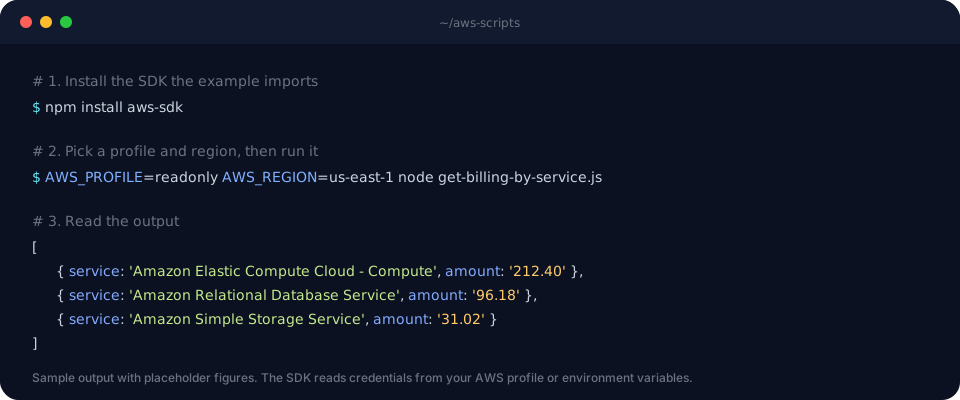
You need Node.js, an AWS account and credentials the SDK can find. The whole setup takes about five minutes the first time.
- Open an example and copy the codeStart with a read-only one, such as billing by service or listing buckets without versioning, to confirm your setup works.
- Install the SDK it importsExamples that
require('aws-sdk')use v2. Examples that import from@aws-sdk/…use v3 and need each client package.$ npm install aws-sdk $ npm install @aws-sdk/client-s3 @aws-sdk/s3-request-presigner
- Give the SDK credentials and a regionUse a profile from
~/.awsor environment variables. See AWS’s guide to setting credentials in Node.js. Several examples hard-codeus-west-2, so change it to your region. - Check the IAM permissionsEach guide ends with the actions the script calls. Run it with a role that has exactly those, and use a read-only profile for anything that only reads.
- Run it and compare the outputRun
node script.js, ornpx tsx script.tsfor TypeScript examples, and compare the result with the guide’s “Expected output” section.
What each example guide includes
These aren’t bare snippets. Every guide follows the same six-part structure, so you can judge whether a script fits your account before you run it. The caveats section is the one to read carefully: it tells you when the script only covers one region, skips pagination, or looks at ACLs but not bucket policies.

Why every example uses AWS SDK for JavaScript v3
Every example here uses AWS SDK for JavaScript v3, the modular @aws-sdk/client-* packages. v2 reached end-of-support on September 8, 2025, so it no longer receives updates. If you still have v2 code of your own, moving it to v3 is mostly mechanical, and the step-by-step guide shows how to migrate a Node.js app from AWS SDK v2 to v3:
| SDK v2 | SDK v3 | |
|---|---|---|
| Package | One package: aws-sdk | One per service: @aws-sdk/client-s3 |
| Client | new AWS.S3() | new S3Client({}) |
| Calling an API | s3.listBuckets().promise() | s3.send(new ListBucketsCommand({})) |
| Pagination | Manual NextToken loops | Built-in paginators, e.g. paginateListObjectsV2 |
| S3 object body | Buffer | Stream; call transformToString() |
To convert an example, paste it into the free AWS SDK v2 to v3 converter, then check the result against AWS’s v3 migration guide. If you work in Python or Go, the other AI code converters port SDK code between languages.
Common workflows you can build from these examples
Several examples chain together into routines worth running regularly.
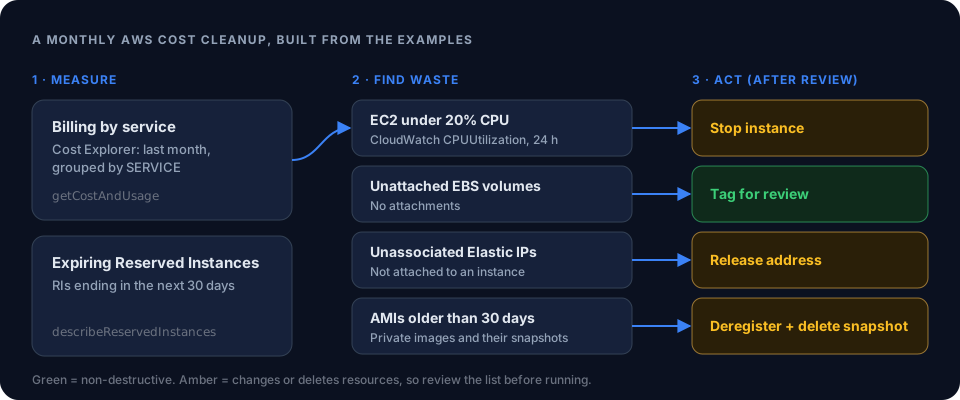
A monthly AWS cost cleanup
Start by breaking down last month’s bill by service to see where to look. If EC2 or EBS dominates, run the idle-instance, unattached-volume, Elastic IP and old-AMI examples to list candidates. Review the list before running anything that stops, releases or deletes. Finally, check for Reserved Instances expiring in the next 30 days, before those instances fall back to on-demand pricing.
A quick security review
Three read-only scripts give you a fast baseline. Scan security groups for open common ports, sort S3 buckets into public and private, and check what your current role can actually do. The bucket script reads ACLs only, so also confirm S3 Block Public Access is on at the account level.
Browser uploads straight to S3
Have your backend generate a presigned upload URL, let the browser PUT the file directly to S3, then confirm the upload with a HeadObject existence check. Your server never handles the file itself, and clients never see your AWS keys. If you’re estimating what that storage will cost, try the S3 pricing calculator.
Tips for running AWS scripts safely
- Read before you write. For any script that stops, releases or deletes, first comment out the action call and log what it would affect.
- Separate read and write credentials. Run discovery scripts with a read-only profile, and switch to a scoped write role only for the action step. This follows AWS’s least-privilege guidance.
- Loop over regions. Most examples act on a single region. Resources such as Elastic IPs, EBS volumes and AMIs are regional, so waste in other regions won’t show up.
- Add pagination for large accounts. Several examples read only the first page of results. Follow
NextTokenin v2, or use the built-in paginators in v3. - Back off on throttling. Describe calls across hundreds of resources can hit API rate limits. Retry with exponential backoff instead of failing halfway through.
Common mistakes to avoid
- Treating unblended cost as your final bill. The Cost Explorer examples use
UnblendedCost, which excludes credits and Savings Plans discounts. - Running cost scripts in a loop. Each Cost Explorer API request costs $0.01. Cache the results instead of polling.
- Deleting AMIs that are still in use. An AMI can be old but still referenced by a launch template or an Auto Scaling group. Check before deregistering it.
- Committing credentials. Never paste access keys into a script. Let the SDK read them from your profile, environment or IAM role.
Frequently asked questions
Which version of the AWS SDK for JavaScript do these examples use?
All of them use the modular AWS SDK for JavaScript v3 packages, such as @aws-sdk/client-s3. The v2 aws-sdk package reached end-of-support on September 8, 2025, so convert any v2 code of your own to v3 before using it in new projects.
What do I need to install to run an example?
Node.js and the SDK packages the example imports, such as npm install @aws-sdk/client-s3. For TypeScript examples, run them with a TypeScript runner such as tsx, or compile them with tsc first.
How do the examples get my AWS credentials?
The examples create SDK clients without hard-coded keys, so the SDK uses its default credential chain: environment variables, your shared ~/.aws config and credentials files (including SSO profiles), or the IAM role of the machine or Lambda function running the code. Set AWS_PROFILE to choose a profile.
Will running these examples cost money?
Most describe and list calls are free. The Cost Explorer examples cost $0.01 per API request, and CloudWatch metric requests can be billed once you’re past the free tier. Examples that stop, release or delete resources change your bill directly, which is usually the point.
Can I run these examples in AWS Lambda?
Yes. Wrap the code in a handler, give the function an execution role with the permissions listed in the example, and remove any hard-coded region if you want it to use the function’s region. For large accounts, watch the 15-minute Lambda timeout and paginate API calls.
Are the examples safe to run against production?
The read-only examples are, when you run them with a read-only IAM role. Four examples change resources: stopping underutilized EC2 instances, releasing Elastic IPs, deregistering old AMIs and deleting their snapshots, and deleting old Lambda versions. Run those in a test account first, log what they would change, and only then let them act.
How is this different from the ChatWithCloud CLI?
These examples are code you copy, adapt and run yourself. The ChatWithCloud CLI takes a plain-English question in your terminal, writes and runs the AWS SDK calls against your account for you, and explains the result.
Rather ask than write the script?
Ask ChatWithCloud “which EBS volumes are unattached?” in your terminal. It writes and runs the SDK calls for you. The first 15 runs are free.