ChatWithCloud Pricing
Start with 15 free runs against your own AWS account. After that, pick a managed subscription ($19 a month or $190 a year) if you don’t want to deal with an OpenAI key, or the lifetime license if you’d rather pay once and cover model usage on your own OpenAI account.
- 15 free runs, no card needed
- Monthly plans cancel anytime
- AWS credentials stay on your machine
Plans
Free trial
Try it on your real AWS account. No card, no signup, no OpenAI key.
- Every use case: cost, security, troubleshooting, fixes
- Model usage covered
- Uses your existing AWS profiles
Monthly
Unlimited usage with no OpenAI key. All model costs are on us.
- Unlimited usage
- No OpenAI key needed, all costs on us
- Smarter model and better responses
- Fully managed service
Yearly
Everything in Monthly, billed once a year for less.
- Everything in Monthly
- Save $38 a year vs monthly
- No OpenAI key needed, all costs on us
- One renewal a year
Lifetime license
Pay once, use forever with your own OpenAI API key.
- Pay once, use forever
- Bring your own OpenAI key
- Choose your OpenAI model
- Model usage billed by OpenAI
Prices in USD. Licenses are sold and validated through Lemon Squeezy.
Lifetime license vs managed subscription
Both paid plans run the same CLI on your machine, with the same AWS access. The difference is who pays for the AI model and where your prompts are sent.
| Free trial | Monthly or yearly | Lifetime license | |
|---|---|---|---|
| Price | $0 | $19 per month or $190 per year | $399 one-time |
| OpenAI API key | Not needed | Not needed | Required (your own) |
| Who pays for model usage | Included | Included | You, on your OpenAI bill |
| AI model | Chosen by the managed service | Chosen by the managed service (the “smarter model”) | You pick in setup: GPT-4o, GPT-4o Mini, GPT-4 Turbo or GPT-4 |
| Usage | First 15 runs | Unlimited | No ChatWithCloud cap; your OpenAI rate limits and spend apply |
| Where prompts and AWS results go | ChatWithCloud’s managed AI service | ChatWithCloud’s managed AI service | Straight to OpenAI with your key |
| Availability | Always | Always | Always |
On every plan, your AWS credentials stay on your machine: the CLI signs AWS requests locally. What gets sent for processing is your question and the data returned by the AWS calls it runs. The security page covers exactly what’s sent and where.
Which plan is right for you?
You check AWS now and then
Monthly cost reviews and the occasional “why is this broken?” don’t add up to much model usage. If you expect to use it for years and already have an OpenAI key, a one-time license means no recurring bill. Compared with the yearly plan it pays for itself in a little over two years, plus your own OpenAI usage.
Lifetime licenseYou use it every day
If ChatWithCloud is part of your daily debugging and cleanup, unlimited usage at a flat price means you never have to watch a token meter.
Managed subscriptionYou don’t want to manage API keys
No OpenAI account, no key to rotate and no separate bill. You enter one license key and you’re done.
Managed subscriptionYou already pay for OpenAI
If you have OpenAI API billing and usage limits set up, the lifetime license reuses them and lets you choose the model yourself, including cheaper ones like GPT-4o Mini.
Lifetime licenseNot sure yet? Use your 15 free runs on real questions first. The use cases page has ideas for what to ask.
What you’ll pay beyond the license
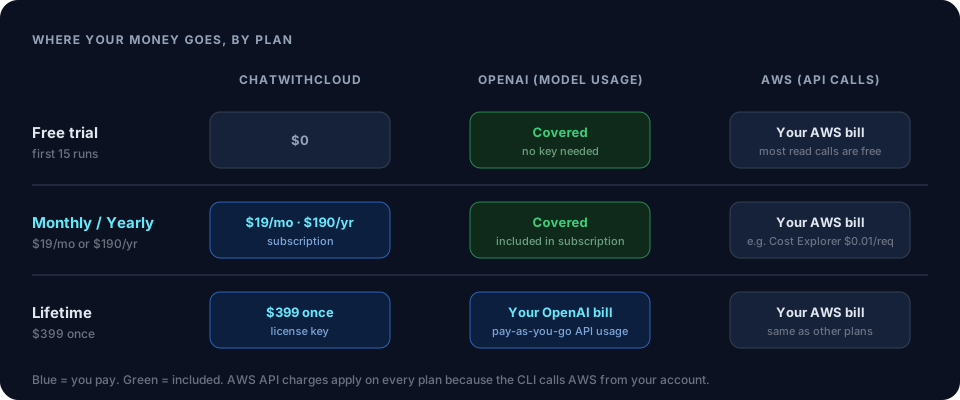
The plan price isn’t always your whole cost. Two other bills can apply, depending on your plan and what you ask.
OpenAI API usage (lifetime license only)
With the lifetime license, the CLI calls OpenAI directly with your API key, so OpenAI bills you for the tokens each question uses. The cost depends on the model you select and how much data your AWS calls return. A question that lists hundreds of resources sends more tokens than one that counts them. See OpenAI’s API pricing for current per-token rates, and set a monthly budget in your OpenAI account if you want a hard ceiling.
AWS API charges (every plan)
ChatWithCloud answers questions by calling AWS APIs from your account, so AWS bills those calls as usual. Most describe and list calls are free. Some aren’t: for example, each Cost Explorer API request costs $0.01, so spend questions add a few cents. And if you ask it to create resources, those resources are billed like any others.
Tip: changes can save money as well as cost it. Stopping idle instances or releasing unused Elastic IPs lowers your AWS bill. The practical AWS examples show the same checks as scripts you can run yourself.
How the free trial and license activation work
- Run the CLIRun
npx chatwithcloud(or use brew, pnpm or bun). On first run, it asks for your AWS experience level and a model, whether you have an OpenAI key, and whether to enable anonymous analytics. - Use your free runsWithout a license, requests go through the managed service, so you don’t need an OpenAI key during the trial.
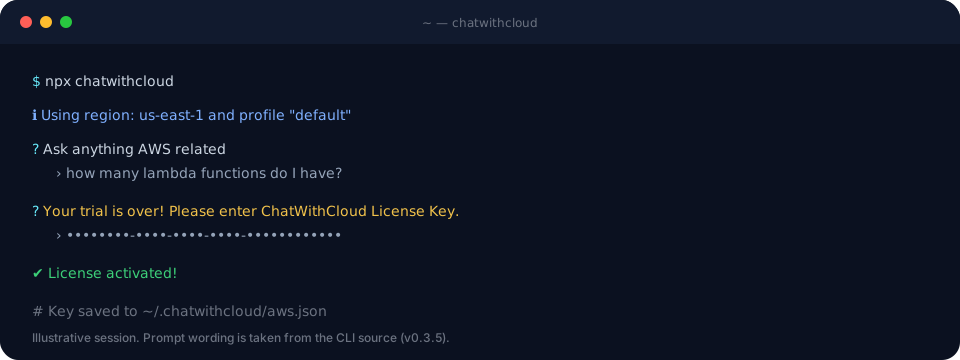
- Enter your license key when the trial endsThe CLI tells you the trial is over and asks for a ChatWithCloud license key. It activates the key with Lemon Squeezy and saves it to
~/.chatwithcloud/aws.json. - Lifetime only: add your OpenAI keyIf the key isn’t a subscription, the CLI also asks for your OpenAI API key. You can change it, and the model, at any time by typing
/settings.
Want to know what happens between your question and the answer? How it works walks through a full run.
Pricing questions
Can I move from the lifetime license to the subscription later?
Yes. Buy the subscription, then replace the licenseKey value in ~/.chatwithcloud/aws.json with your new key. The CLI validates the key when it starts, recognizes it as a subscription, and sends requests through the managed service instead of your OpenAI key.
Why does the lifetime plan need my own OpenAI key?
Because it’s a one-time payment. Model usage is an ongoing cost, so on the lifetime plan it goes on your OpenAI account instead of being bundled in. That’s also what lets you pick the model.
Can I choose the AI model on the subscription?
The model you pick in /settings applies when the CLI calls OpenAI directly with your key, which is the lifetime plan. On the subscription and the trial, the managed service chooses the model.
Do I need an OpenAI account for the free trial?
No. Trial runs go through the managed service, so you only need Node.js (or brew, pnpm or bun) and AWS credentials on your machine.
Will asking questions add to my AWS bill?
Usually not by much. Most read-only calls are free, but some, like Cost Explorer queries, cost $0.01 per request, and any resources you ask it to create are billed normally. Run it with a read-only IAM role if you want to rule out changes entirely.
Questions about setup, security or supported services are answered in the full FAQ.
Start with 15 free runs
No signup, no card and no OpenAI key. It uses the AWS profiles you already have.