What You Can Ask Your AWS Account With ChatWithCloud
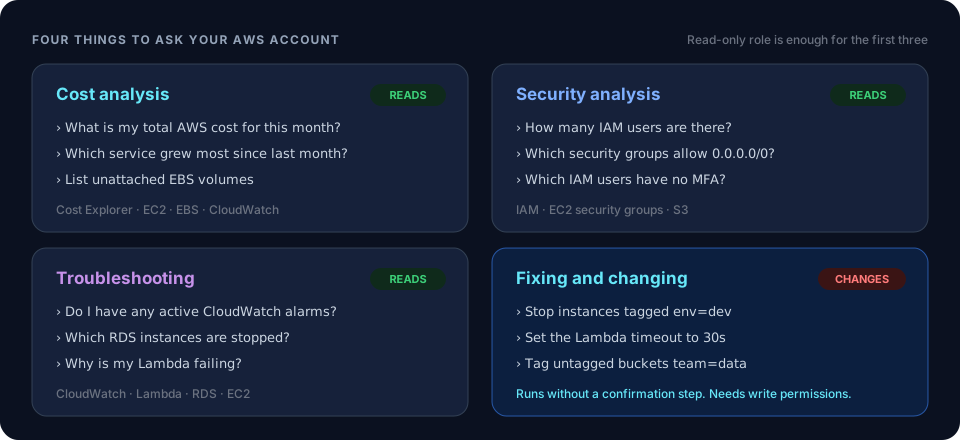
ChatWithCloud turns a plain-English question into AWS SDK calls, runs them against your account from your terminal, and explains the result. That makes it useful for four kinds of work: understanding your AWS bill, checking your security posture, troubleshooting problems, and making changes. Here’s what each looks like in practice, and when a different tool is the better fit.
Four jobs, one prompt
Every use case works the same way. You ask a question, and the AI model writes JavaScript that uses the AWS SDK. The CLI runs that code on your machine with the AWS profile you picked, and the model turns the JSON result into an answer. It keeps the conversation going, so you can follow up with “which of those are in production?” without starting over. The step-by-step walkthrough covers the mechanics.
Three of the four use cases only read from your account, so a read-only IAM role is all they need. The fourth changes resources, and that difference matters more than anything else on this page.
AWS cost analysis
Ask where your money goes without opening Cost Explorer, building a report and exporting a CSV. ChatWithCloud queries AWS Cost Explorer for spend, and the EC2, EBS and CloudWatch APIs for the resources behind it. Then it can answer the follow-up: what’s driving the cost, and what’s sitting idle?
- What is my total AWS cost for this month?Built into the CLI as a suggested question
- Break down last month’s bill by service and compare it with the month before
- Which EC2 instances averaged under 5% CPU over the last two weeks?
- List EBS volumes that aren’t attached to anything, with their size
- Do I have Elastic IPs that aren’t associated with an instance?
Cost questions call the Cost Explorer API, which AWS bills at $0.01 per request. A few questions a day is negligible, but it isn’t free.
Want the script instead?For a monthly report you run on a schedule, start from the billing-by-service example or the unattached EBS volume finder.
AWS security analysis
Inventory your resources and spot risky settings: who has access, what’s exposed to the internet, and where MFA is missing. This is a quick, ad-hoc check that gives you answers in a minute. It’s handy before an audit, after inheriting an account, or when something looks off.
- How many IAM users are there in my account?Built into the CLI as a suggested question
- How many security groups do I have, and can you name a few?Built into the CLI as a suggested question
- Which security groups allow inbound traffic from 0.0.0.0/0, and on which ports?
- Which IAM users have console access but no MFA device?
- Which S3 buckets don’t have Block Public Access fully enabled?
Want the script instead?See finding security groups open on common ports and sorting S3 buckets into public and private.
Troubleshooting AWS problems
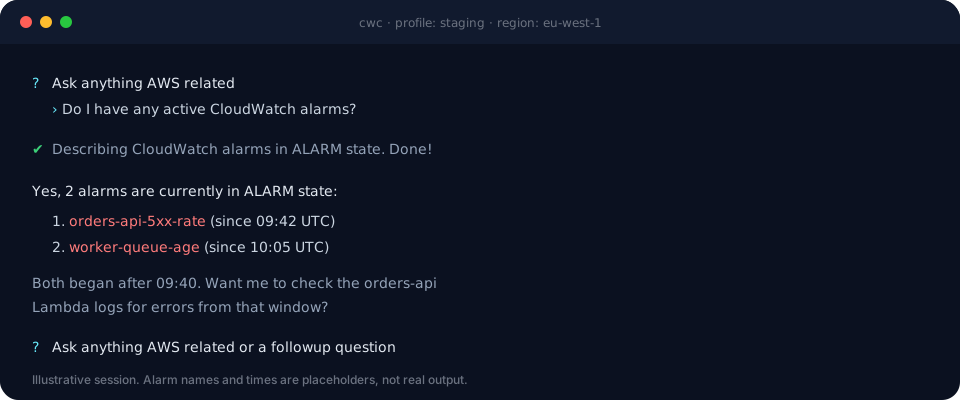
When something breaks, the slow part is gathering context: which alarm fired, what state the instance is in, when the errors started. ChatWithCloud pulls that from CloudWatch, Lambda, EC2 and RDS in one go, and the conversation keeps its context. You can go from “what’s alarming?” to “show me the errors from that function” without re-explaining.
- Do I have any active CloudWatch alarms?Built into the CLI as a suggested question
- Can you tell me how many RDS instances I have, and are they running or stopped?Built into the CLI as a suggested question
- Which Lambda functions had errors in the last hour?
- Why can’t I reach instance i-0abc…? Check its state, security groups and subnet route table
Want the script instead?Walk through why you can’t SSH into an EC2 instance or a Route 53 domain that isn’t serving CloudFront.
Fixing and changing infrastructure
ChatWithCloud isn’t limited to reading. Ask it to stop instances, update a function’s configuration or tag resources, and it writes and runs the SDK calls to do it. For small, well-defined changes, that beats clicking through several console pages.
- Stop all EC2 instances tagged env=dev
- Set the timeout of the checkout Lambda function to 30 seconds
- Add the tag team=data to every S3 bucket that has no tags
Changes run without a confirmation step
The CLI tells the model to assume you want to proceed, so it doesn’t ask before running generated code, including code that modifies or deletes resources. The only limit is what your IAM credentials allow. Use a read-only profile by default, and switch to a profile with write access only when you mean to make a change. The security page explains how to set this up.
Want the script instead?For changes you’ll repeat, keep a reviewed script, such as stopping underutilized EC2 instances or deleting old Lambda versions.
Who it’s for, by AWS experience
On first run, ChatWithCloud asks for your AWS experience level and uses it to tailor its answers. You can change it later by typing /settings.
| Level | Typical situation | Good first questions |
|---|---|---|
| Beginner | You’ve used EC2, S3 and Lambda a little, and the console feels overwhelming. | “What’s running in my account and what does it cost?” “Can you list all the S3 buckets in my account?” |
| Intermediate | Comfortable with S3, Lambda, IAM and CloudWatch, but tired of hunting across consoles. | “Which Lambda functions had errors today?” “Which security groups are open to the internet?” |
| Pro | Years on AWS. You know the APIs, but ad-hoc scripts eat your time. | “Unattached EBS volumes over 100 GB in every region.” “IAM users with access keys older than 90 days.” |
Beginners get the most out of it as a guide to what they already have. Experienced engineers mostly use it to skip writing one-off scripts.
When to use something else
- Repeatable automation. A job that runs every night belongs in a reviewed script or pipeline, not a chat. Browse the practical AWS SDK examples for starting points.
- Migrating code. To move AWS SDK v2 code to v3, or Terraform to CDK, use the AI code converters. They transform code you paste in and never touch your account.
- Continuous compliance. ChatWithCloud gives point-in-time answers. For ongoing checks against security standards, use a service built for it, such as AWS Security Hub.
- Large or risky production changes. Put them through infrastructure as code and code review, where a diff shows exactly what will change before it happens.
Questions about these use cases
Which AWS services can I ask about?
Anything the AWS SDK for JavaScript v2 can call, since that’s what the generated code uses. That covers EC2, S3, IAM, Lambda, RDS, CloudWatch, Cost Explorer, Route 53, CloudFront and most other services. Services or features launched after SDK v2’s end-of-support may be missing.
Can it look at more than one account or region?
Each session uses one AWS profile, picked at start or set with AWS_PROFILE, and that profile’s default region (us-east-1 if none is set). To check other regions, say so in your question, for example “in every region”. To switch accounts, start a new session with another profile.
What does it need from IAM?
Only the permissions the question needs. For cost, security and troubleshooting questions, AWS’s managed ReadOnlyAccess policy is enough, although Cost Explorer needs its own ce: permissions. Grant write permissions only to a separate profile you use for changes.
Ask your first question
The first 15 runs are free, and you don’t need an OpenAI key. After that, see pricing.